
Affiliate notice: This guide contains affiliate links. As an Amazon Associate I earn from qualifying purchases.
For a Twingo Renaultsport 133, a basic engine reader may be sufficient for an engine-emissions question, but it is not a complete answer to an airbag or ESP warning. Choose confirmed Renault-aware access when the concern belongs to restraints, ABS, electric steering or another fitted system. The car’s small size and simple manual drivetrain do not make all its electronics part of the generic engine scan.
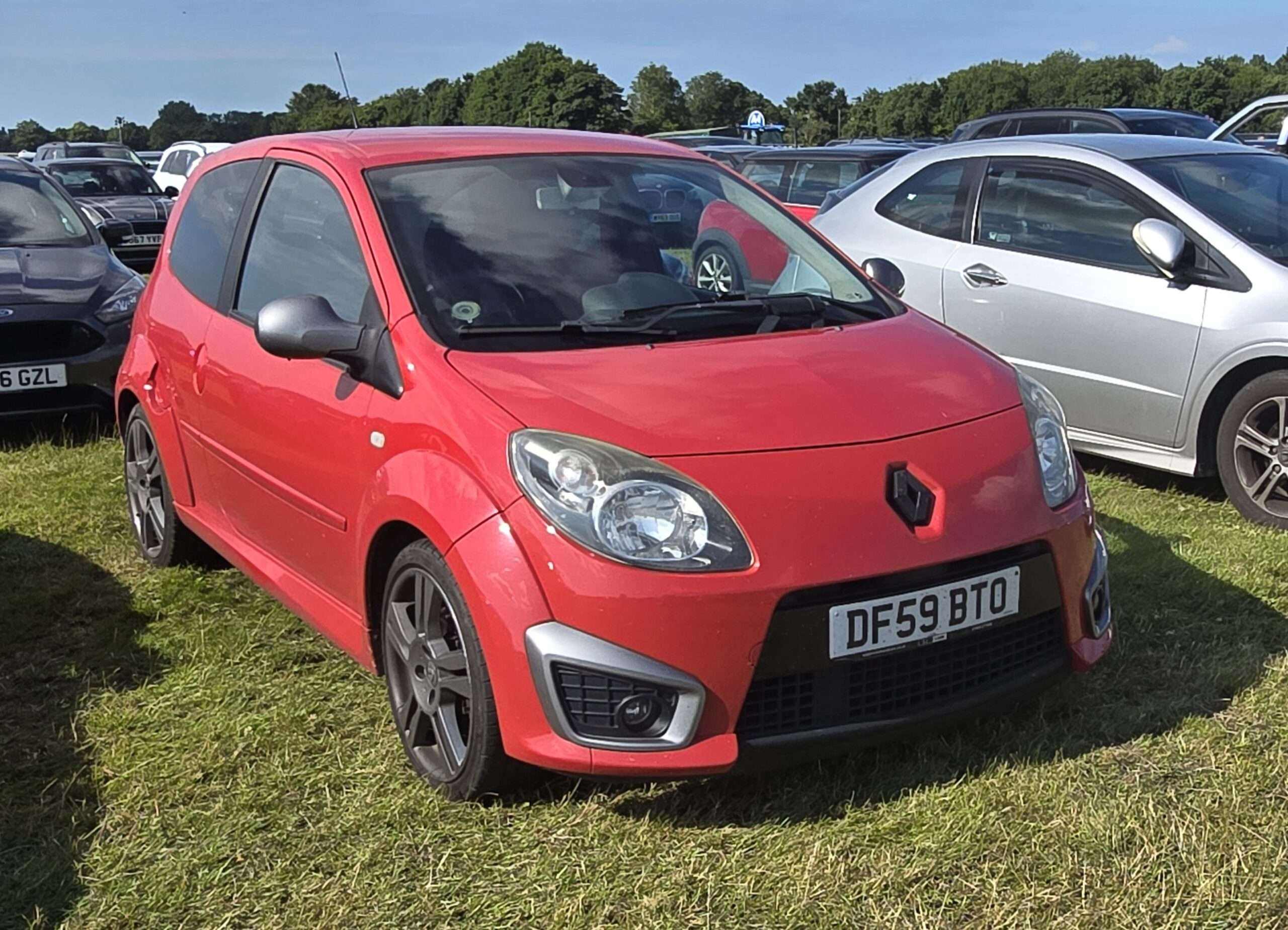
This guide covers the front-engined Twingo II 133, not the later rear-engined Twingo III GT or the related Renault Wind. The advice is desk-researched. Unusual Cars has not independently tested a Twingo, a handheld reader or any diagnostic function.
Which Twingo does this guide cover?
UK RHD Twingo II/X44 Renaultsport 133 three-door hatch road cars, 2008–2013 production family; 1.6-litre naturally aspirated K4M petrol and five-speed manual. Include pre/facelift, genuine UK Cup/Cup chassis and special-edition variations such as Gordini and Silverstone GP with original equipment checked. Exclude Twingo II 1.2/GT, Twingo III rear-engined GT, Wind, race/rally cars, imports and materially altered engine, restraint or control systems.
| Version | What to establish |
|---|---|
| Pre-facelift and facelift 133 | Original build and actual fitted controller/equipment specification. |
| Cup model or Cup chassis option | Identify which description applies; do not copy a Clio 172 Cup’s equipment deletions. |
| Gordini and Silverstone GP | Confirm the genuine UK edition and original equipment; a badge alone is insufficient. |
| Modified seats or competition equipment | Outside this guide’s standard restraint assumptions; seek a suitable specialist assessment. |
The 2012 UK Renaultsport brochure describes the Twingo 133’s engine, electric steering and equipment. Renault’s original launch description also identifies ESP and its sports steering setup. Use period documents for the right build rather than treating one facelift brochure as a list for every earlier car.
Quick choice: match the reader to the warning
| Owner question | Sensible reading route | Important limit |
|---|---|---|
| Engine warning or supported emissions information | Compatible generic EOBD reader | Engine reporting is not a whole-car health check. |
| Airbag/spanner warning with no engine codes | Confirmed Twingo II SRS access | The restraint controller needs its own report. |
| ABS/ESP or steering concern | Confirmed access to the relevant fitted controller | Lamp behaviour and mechanical safety cannot be established by a generic app. |
| Several unrelated electrical symptoms | Appropriate Renault-aware report plus interpretation | Fault history and the car’s real equipment matter. |
An airbag lamp can coexist with no engine codes
A Twingo owner question describes airbag and spanner lamps while a diagnostic reader showed no codes. The full discussion was not accessible during this review, so we do not adopt a repair conclusion from it. The indexed question illustrates a basic diagnostic distinction: the tool may have read only the engine system.
A restraint fault is recorded and interpreted in the context of the restraint system, where supported. Ask whether the proposed reader can reach the actual SRS controller on your Twingo II 133. Preserve the controller identity, complete code, wording and status instead of relying on an app’s “no faults” message.
This is not an invitation to manipulate seat connectors, fit resistors, remove warning lamps or recode equipment. Do not treat a code mentioning a circuit as proof that its named component needs replacement. Appropriate safety procedures and qualified restraint assessment are required beyond this read-only explanation.
What generic EOBD can usefully tell you
On a compatible car, generic EOBD can provide supported engine-emissions codes, readiness information and some freeze-frame or live data. That can be a practical first step for an engine warning. The information available depends on both the vehicle and the reader; a menu item does not guarantee the underlying measurement is supplied.
A scanner may offer a generic OBDII mode and a separate Renault menu. Keep the mode with the saved report. A clean result in one is not a statement about everything in the other. Connecting through the same 16-pin socket does not make engine, restraint, ABS and body reporting interchangeable.
ESP status is not the same question as an ESP fault
An RS 133 owner discussion asks how to interpret the ESP lamp and switch. The useful distinction is between a driver-selected system state, a brief lamp check and a persistent fault warning. Use the handbook matching the car rather than assuming every illuminated symbol has the same meaning.
Renault’s product descriptions establish that the 133 has relevant electronic driver-aid and steering equipment. They do not establish every parameter a consumer scanner can display. If there is a fault question, obtain the appropriate controller report and the exact message. This guide does not provide an ESP-disable test or encourage provoking an intervention on the road.
A warning concerning brakes or steering needs suitable professional assessment. It is not enough to erase it and find that the dash looks normal. A generic engine scan, a brief restart or an online explanation cannot certify the operation of a safety system.
Electric steering, body electronics and several warnings
For a steering concern, ask whether the exact Twingo II variable-assistance system can be read. For a body-electrical concern, identify the affected equipment and whether supported body/interconnection reporting is available. Do not promise a steering calibration or a particular switch-state readout without exact documentation.
If several warnings appear together, record their order, starting behaviour, recent maintenance and battery history. There may be a relationship worth investigating, but a collection of lamps is not a battery diagnosis. Supply and communication checks can require work outside the scanner as well as properly interpreted module reports.
Record whether equipment is original. Replaced seats, added audio equipment, previous repairs and aftermarket electronics can affect the assessment without proving a cause. A tool’s family-level list can include modules or options that the actual 133 does not have. Absence of an unfitted controller is not evidence of a failed scanner.
Cup and special editions need an equipment check
A Twingo Cup label must not inherit the Clio 172 Cup no-ABS exception. Identify the Twingo’s own factory equipment and optional chassis package. Likewise, an ordinary Twingo or a later rear-engined GT is not a compatibility substitute merely because the model name is shared.
The 133 uses a five-speed manual drivetrain in this scope. A Twingo-family automatic-transmission entry does not establish a controller on this car. Mechanical clutch, gearbox, suspension and steering complaints may need inspection even when an electronic report is clear. A scanner cannot assess every kind of wear or certify a used car’s condition.
What the handheld coverage evidence establishes
The FR V2 reference document lists Twingo II engine, ABS, airbag and other controller categories. Its reference-only status and some conditional entries matter: the family list is a starting point for checking a particular 133, not an exact equipment or function guarantee.
Specify Twingo II/X44, the 1.6 petrol engine, five-speed manual, build and desired controller when asking about coverage. Ask separately about code reading and any particular data item. Do not apply a diesel routine, an automatic gearbox function, a Twingo III entry or Wind roof support to this car.
Choosing a complete supported setup
A Renault-aware handheld should be bought as an identified package: genuine tool model, included vehicle software, connector/interface, current database and the controller function required. The iCarsoft FR V2.0 is a candidate for that check. The FR V3.0 advertises a wider feature set, but an upgrade is useful only when a documented extra function helps on the actual car.
Supported handheld reading can operate independently of a phone or laptop. Database updates may need a compatible PC and the package-specific connection or card reader. Check the serial-specific update instructions and current operating-system requirements. The manufacturer advertises free lifetime updates for the FR models; verify the exact product and seller rather than assuming an unfamiliar listing has the same support.
A genuine Autel AL519-type generic reader is an engine/emissions alternative, not proof of Renault non-engine access. A suitable multibrand tool such as the MD808 Pro can be another candidate where its precise coverage is confirmed. Distinguish model variants and software packages; the most expensive unit is not automatically the best fit.
Legitimate Renault CLIP and the specialist route
Renault’s January 2026 applicability list identifies X44 on CLIP BORNEO2. This is platform applicability, not proof of every service function. Match the official interface requirements to the actual vehicle; a generic ELM327 or J2534 label is insufficient.
The official ASOS offer has its own access, authentication, software and subscription arrangements. The May 2026 prerequisites specify supported Windows editions and interface conditions. Buying a cable does not provide all of that. A properly equipped specialist can be the sensible choice for a one-off difficult concern; copied software bundles are outside this guide.
Make the first report useful
Record the actual vehicle, fitted equipment, symptom and recent work before choosing the diagnostic entry. Keep the tool name and software version with the report. Save the original controller names, codes, descriptions, status and available freeze-frame or live information before clearing anything. If the scan was generic-only, label it as engine/emissions reporting.
Ask what the report does not cover. A module that did not reply is different from one that replied with no stored faults, while a module absent from the car should not be expected. Translate uncertainty into a specific coverage or diagnostic question rather than a parts order. Reading information, clearing faults, resetting, commanding a component and rewriting software are distinct operations.
Love cool cars? Join Unusual Cars Club FREE!
Get forgotten motoring finds, stories, helpful car content and more.
Free to join. No spam. Unsubscribe whenever you like. See our privacy policy.
Frequently asked questions
Will the FR V2.0 definitely read every system on this car?
No blanket guarantee is supported here. Confirm the build, controller, software package and specific reading task. A brand logo or family-level row is not proof of full access to a particular RS. Use the purchase enquiry to establish the functions you need rather than assuming all advertised services apply.
Do I need to buy CLIP?
Not necessarily. A confirmed handheld may cover the reading task, and a reputable generic reader may be enough for an engine-emissions question. A specialist with legitimate CLIP can provide a targeted report without the owner buying and maintaining the complete workshop setup.
Can the scanner fix the warning by clearing it?
Clearing diagnostic information does not repair the underlying cause and can remove useful evidence. Save the report first and establish what needs investigating. A warning that disappears is not a safety or condition certificate. Seek appropriate help where the system or symptom affects safety or drive control.
Does this guide establish coding, resets or active tests?
No. Exact write, calibration, learning and command functions require separate vehicle-specific evidence and procedures. This guide deliberately focuses on selecting supported diagnostic reading. It provides no immobiliser, key-programming or security-access instructions.
More Renault diagnostic guides
Browse all Renault diagnostic scanner guides or the main car diagnostic directory. Each generation has its own scope and evidence.
Related live guide: Mégane II 225/R26. Clio III 197/200 covers the earlier manual Clio, while Clio II 172/182 has different early-car and equipment questions.
Compare related Renault guides: Mégane III Renaultsport 250/265/275 · Clio IV RS 200/220 EDC.
Sources and limitations
Research reviewed: 15 October 2026. The article uses Renault documents, tool documentation and owner-question research. Forum anecdotes identify questions; they do not establish failure rates, causes or exact scanner capabilities. Functions can vary by build, module, software, interface and tool version.
Key references: Renault CLIP applicability; official setup prerequisites; FR V2 reference compatibility; current update route.
Photo: Calreyn88 / Wikimedia Commons — CC BY-SA 4.0. Original scene retained; resized for display.
ALSO …
 Renault Mégane 250/265/275 Diagnostic Scanner Guide: OBD2 and Renault-Aware Tools
 Renault Clio RS 200/220 EDC Diagnostic Scanner Guide: Gearbox Codes and OBD2
 Renault Mégane 225/R26 Diagnostic Scanner Guide: OBD2 and Renault Diagnostics
 Renault Clio 172/182 Diagnostic Scanner Guide: OBD2 and Renault-Aware Tools