
Affiliate notice: This guide contains affiliate links. As an Amazon Associate I earn from qualifying purchases.
For a Clio IV RS 200 EDC or 220 Trophy, the key buying question is whether the tool can read the controller involved in your warning. Generic OBD2 can provide useful engine-emissions information, but a Check Auto Gearbox complaint needs confirmed transmission-controller reporting. That is a stronger reason to investigate a Renault-aware scanner than a long list of advertised reset functions.
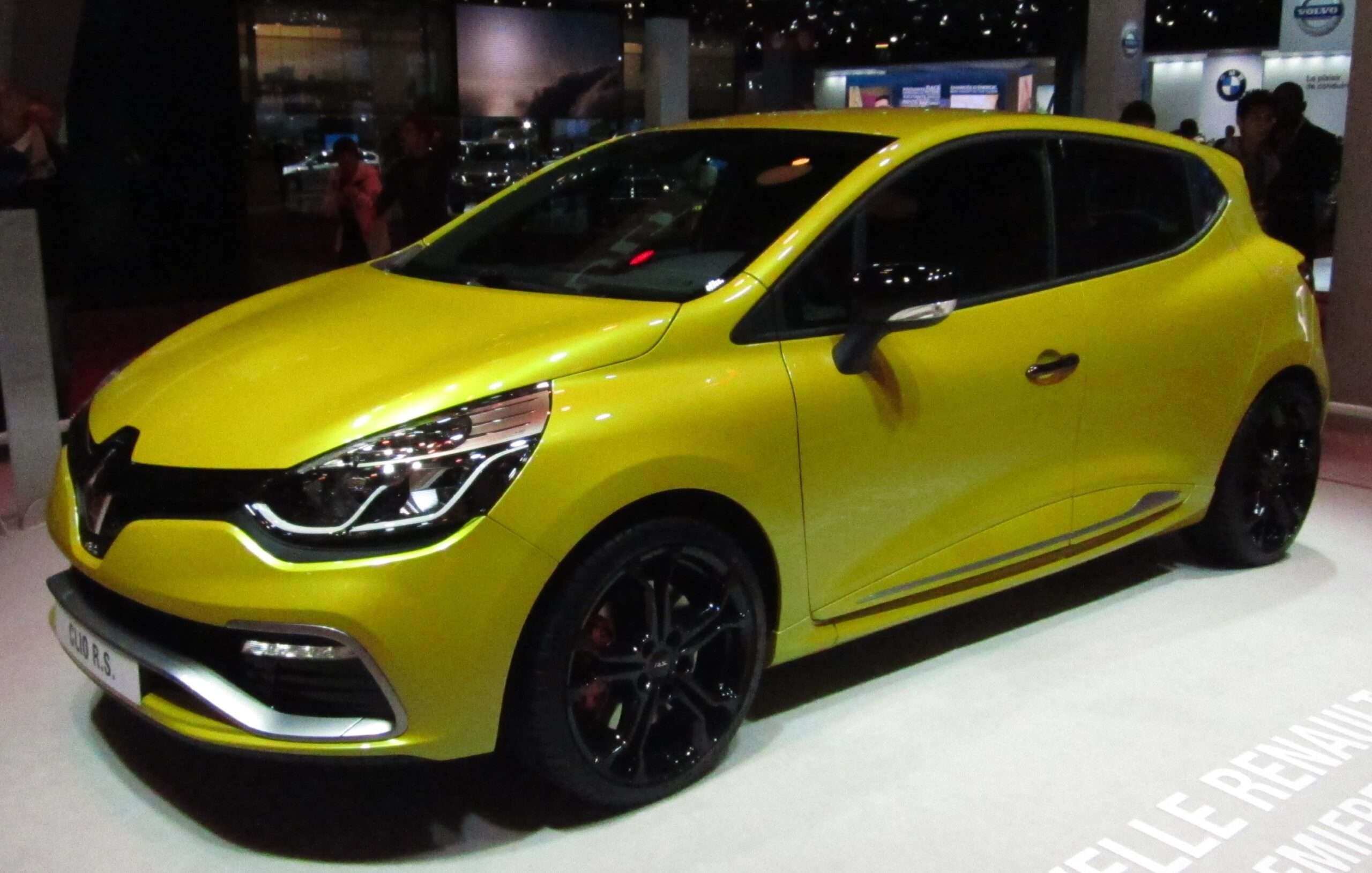
This is the turbocharged, five-door Clio with EDC. It is separate from the earlier naturally aspirated Clio III 197/200 manual. Unusual Cars has researched the documents and owner questions; we have not independently tested a Clio EDC, a scanner or an adaptation routine.
Which Clio does this guide cover?
UK RHD Clio IV/X98 Renaultsport five-door hatch road cars, 2013–2018 UK range, identified by original build if registered later. 1.6-litre turbo petrol and six-speed EDC dual-clutch transmission: RS 200 EDC and RS 220 Trophy, pre/facelift and genuine UK special editions such as RS 18 where applicable. Exclude Clio III naturally aspirated 197/200, ordinary Clio/GT 1.2 EDC, later RS Line trim, Clio V, RS 16 concept, competition cars, imports and materially modified engine/gearbox electronics.
| Variant | Keep these details with the scan |
|---|---|
| RS 200 EDC | Build, phase and original engine/transmission identification. |
| RS 220 Trophy | Identify the real Trophy and its software/equipment; do not assume every 200 function carries over. |
| Facelift and genuine UK RS 18 | Record fitted systems and exact build; a special-edition badge is not a coverage guarantee. |
| Clio III200 or ordinary 1.2 EDC | Outside this guide: different generation or powertrain. |
Renault’s 200/220 powertrain description identifies the six-speed dual-clutch route. Its RS 18 announcement places that special edition with the 220 Trophy family. These releases establish model identity; they do not prove exact UK options or consumer-tool functions on an individual car.
Quick choice: engine reader or EDC-aware diagnostics?
| Complaint | Useful diagnostic scope | Do not assume |
|---|---|---|
| Engine warning with no transmission complaint | Supported generic engine codes and data | A generic connection surveys every fitted system. |
| Check Auto Gearbox, missing drive or shift concern | Confirmed EDC controller code reading and available context | A tool listing “transmission” supports every EDC parameter or repair routine. |
| ABS, restraint or steering warning | The named fitted controller | A clean engine scan rules out that system. |
| Several simultaneous warnings | Saved reports from the relevant controllers | The first code or an online anecdote identifies the root cause. |
What generic OBD2 can contribute
A compatible reader can report supported emissions-related engine information, including codes and some freeze-frame or live data. This can be helpful when an engine warning accompanies another complaint. Generic reporting remains a limited diagnostic layer; a car can have a gearbox concern while an engine-only scan is incomplete or uninformative.
Some tools provide both a generic OBDII menu and a Renault-specific selection. Record which was used. A generic powertrain message or a request to investigate another control system is not the same as reading the EDC controller itself. A successful connection and a reassuring app summary do not establish that the right module was interrogated.
Check Auto Gearbox: start with the original report
In the opening post of a 2015 Clio220 Trophy owner discussion, the owner describes a gearbox warning, loss of some gears and a reported clutch-torque fault description. The discussion contains several suggestions. It provides a useful owner question, not a diagnosis or a repair instruction for another car.
Ask the workshop or vendor whether the tool reaches the actual transmission controller on your build. The report should preserve the controller identity, full fault code, wording and status, together with any supported context. A dashboard message by itself cannot distinguish a clutch, actuator, supply, wiring, software or controller concern. Those possibilities need evidence and appropriate interpretation.
The same discussion later includes posts about ordinary 1.2-litre EDC cars. Those are excluded from this RS article. A shared warning or transmission-family name does not justify importing another engine’s repair procedure, part number, operating limit or software recommendation.
Missing drive and intermittent symptoms
A separate 200 EDC owner question concerns a gearbox warning and no drive. Together, these questions show why owners need to know which module a reader can reach. They do not prove how frequently a fault occurs or establish a standard fix.
Record whether the concern occurs cold or warm, when selecting drive or reverse, during a shift, or after a period of traffic. Note the warning order and whether the symptom was present during the scan. Save rather than overwrite the original report. An intermittent symptom disappearing before a workshop visit does not establish that the cause has gone.
Do not deliberately reproduce a loss-of-drive or unsafe shifting event to collect data. If drive or control is compromised, arrange appropriate professional assistance. This guide explains what diagnostic evidence to request; it does not provide a road-test routine, a gearbox repair method or authority to keep driving.
Reading EDC data is different from adapting the gearbox
The scope of a reading function matters. A tool might access stored faults without exposing every live parameter. A menu might offer a value without giving an authoritative condition limit. Ask for the exact parameter and vehicle support rather than assuming “live data” includes all clutch or actuator information.
Do not treat a reported clutch temperature, wear value or learned position as a stand-alone condition certificate. The unit, calculation, operating state and applicable Renault procedure matter. We do not supply universal limits, clutch-learning steps, actuator tests, adaptation sequences, TCM replacement instructions or programming promises.
The ability to read a controller is not evidence of safe configuration or calibration capability. An owner-level handheld can still be useful when it preserves information for a specialist. Buying a more expensive tool solely to access a reset button may add risk without improving the actual diagnosis.
Battery suggestions are evidence to investigate, not a default diagnosis
Owner discussions often mention electrical supply alongside gearbox concerns. Record battery history, recent work and any supply-related faults, but do not prescribe replacement from an anecdote. A displayed voltage at one moment does not establish battery condition under all operating conditions. Appropriate electrical assessment may be needed outside the scanner.
Equally, a gearbox fault should not be declared a failed controller because a forum post reached that conclusion. Retain the original engine and transmission reports and any communication faults. An evidence-led assessment can distinguish the symptoms seen on this car from the repair story of another owner.
ABS, airbags and body equipment still need the correct module
A Renault-aware scan can be relevant beyond EDC. If the warning belongs to restraints, ABS or steering, establish access to that fitted controller. Body and communication reports may also help a professional organise a multi-warning complaint. None of these examples guarantees every controller or data item on every RS build.
Record factory equipment and alterations to seats, steering, audio or control systems. Those changes can affect what should be fitted, without proving the cause of a warning. SRS, braking and steering repairs are outside these owner-level reading explanations; there are no bypass, key-programming or security-access instructions here.
What the FR V2 documentation does and does not show
The FR V2 Renault reference list includes Clio IV transmission and other non-engine controller entries. It is marked reference-only and does not independently confirm each RS 200 or220 function. It supports a shortlist enquiry, not a blanket recommendation.
Ask the supplier to confirm the precise RS build, six-speed EDC and required reading task using the current package. Do not substitute a general “Clio200” answer, a Clio III entry or a non-RS EDC example. This is also the right point to ask which requested parameters are supported and how a saved report can be retained.
Choosing a complete supported setup
A Renault-aware handheld should be bought as an identified package: genuine tool model, included vehicle software, connector/interface, current database and the controller function required. The iCarsoft FR V2.0 is a candidate for that check. The FR V3.0 advertises a wider feature set, but an upgrade is useful only when a documented extra function helps on the actual car.
Supported handheld reading can operate independently of a phone or laptop. Database updates may need a compatible PC and the package-specific connection or card reader. Check the serial-specific update instructions and current operating-system requirements. The manufacturer advertises free lifetime updates for the FR models; verify the exact product and seller rather than assuming an unfamiliar listing has the same support.
A genuine Autel AL519-type generic reader is an engine/emissions alternative, not proof of Renault non-engine access. A suitable multibrand tool such as the MD808 Pro can be another candidate where its precise coverage is confirmed. Distinguish model variants and software packages; the most expensive unit is not automatically the best fit.
Legitimate Renault CLIP and the specialist route
Renault’s January 2026 applicability list identifies X98 on CLIP BORNEO3. This is platform applicability, not proof of every service function. Match the official interface requirements to the actual vehicle; a generic ELM327 or J2534 label is insufficient.
The official ASOS offer has its own access, authentication, software and subscription arrangements. The May 2026 prerequisites specify supported Windows editions and interface conditions. Buying a cable does not provide all of that. A properly equipped specialist can be the sensible choice for a one-off difficult concern; copied software bundles are outside this guide.
Make the first report useful
Record the actual vehicle, fitted equipment, symptom and recent work before choosing the diagnostic entry. Keep the tool name and software version with the report. Save the original controller names, codes, descriptions, status and available freeze-frame or live information before clearing anything. If the scan was generic-only, label it as engine/emissions reporting.
Ask what the report does not cover. A module that did not reply is different from one that replied with no stored faults, while a module absent from the car should not be expected. Translate uncertainty into a specific coverage or diagnostic question rather than a parts order. Reading information, clearing faults, resetting, commanding a component and rewriting software are distinct operations.
Love cool cars? Join Unusual Cars Club FREE!
Get forgotten motoring finds, stories, helpful car content and more.
Free to join. No spam. Unsubscribe whenever you like. See our privacy policy.
Frequently asked questions
Will the FR V2.0 definitely read every system on this car?
No blanket guarantee is supported here. Confirm the build, controller, software package and specific reading task. A brand logo or family-level row is not proof of full access to a particular RS. Use the purchase enquiry to establish the functions you need rather than assuming all advertised services apply.
Do I need to buy CLIP?
Not necessarily. A confirmed handheld may cover the reading task, and a reputable generic reader may be enough for an engine-emissions question. A specialist with legitimate CLIP can provide a targeted report without the owner buying and maintaining the complete workshop setup.
Can the scanner fix the warning by clearing it?
Clearing diagnostic information does not repair the underlying cause and can remove useful evidence. Save the report first and establish what needs investigating. A warning that disappears is not a safety or condition certificate. Seek appropriate help where the system or symptom affects safety or drive control.
Does this guide establish coding, resets or active tests?
No. Exact write, calibration, learning and command functions require separate vehicle-specific evidence and procedures. This guide deliberately focuses on selecting supported diagnostic reading. It provides no immobiliser, key-programming or security-access instructions.
More Renault diagnostic guides
Browse all Renault diagnostic scanner guides or the main car diagnostic directory. Each generation has its own scope and evidence.
Related live guide: Mégane II 225/R26. Clio III 197/200 covers the earlier manual Clio, while Clio II 172/182 has different early-car and equipment questions.
Compare related Renault guides: Mégane III Renaultsport 250/265/275 · Twingo II Renaultsport 133.
Sources and limitations
Research reviewed: 15 October 2026. The article uses Renault documents, tool documentation and owner-question research. Forum anecdotes identify questions; they do not establish failure rates, causes or exact scanner capabilities. Functions can vary by build, module, software, interface and tool version.
Key references: Renault CLIP applicability; official setup prerequisites; FR V2 reference compatibility; current update route.
Photo: Overlaet / Wikimedia Commons — CC BY-SA 3.0. Original scene retained; resized for display.
ALSO …
 Renault Clio 197/200 Diagnostic Scanner Guide: OBD2, Handhelds and CLIP
 Renault Clio 172/182 Diagnostic Scanner Guide: OBD2 and Renault-Aware Tools
 Renault Mégane 250/265/275 Diagnostic Scanner Guide: OBD2 and Renault-Aware Tools
 Renault Twingo 133 Diagnostic Scanner Guide: OBD2, Airbag and Renault Diagnostics