For the petrol Mazda CX-7 2.3 turbo, a useful scanner choice starts with the difference between an engine complaint and a 4WD-system complaint. A basic reader may already capture useful engine evidence. Paying for Mazda-aware coverage makes sense when it adds the specific controller information the investigation needs.
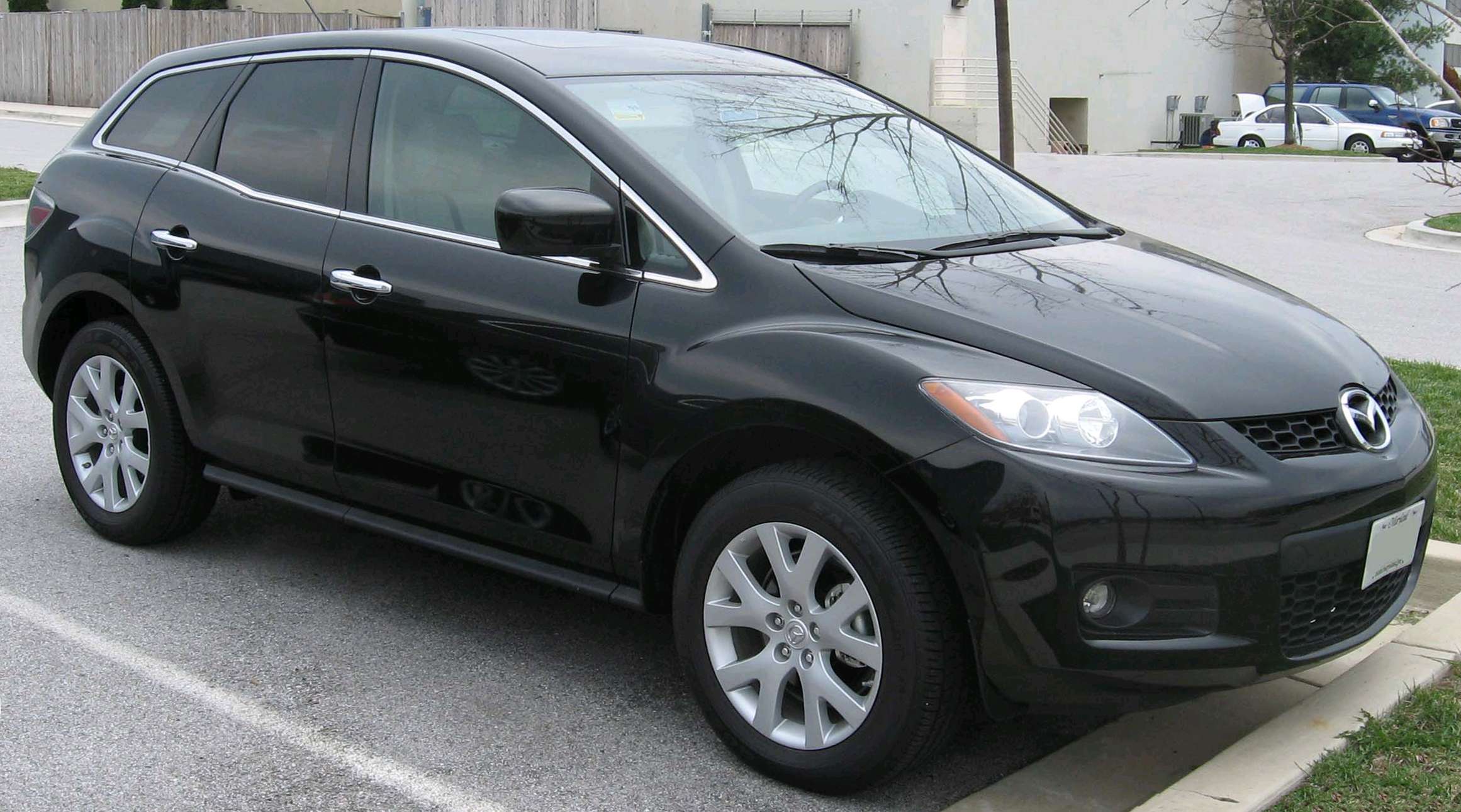
2007 CX-7 photographed in the USA; representative early body style, not a UK-manual specification photograph. IFCAR, public domain, via Wikimedia Commons.
Which car does this guide cover?
This guide concerns the early UK CX-7 2.3 DISI turbo petrol with manual transmission and all-wheel drive, principally the 2007–2009 petrol-era car. The reference catalogue check is 2008 MY. It excludes the later 2.2 diesel and does not transfer North American automatic-transmission coverage to the UK manual.
Mazda reference material: Mazda’s early UK CX-7 brochure identifies the turbo petrol and all-wheel-drive concept. The diagnostic selection still needs the actual production specification; promotional model descriptions are not compatibility certificates.
Generic OBD2 versus Mazda-aware diagnostics
Standard OBD/EOBD is principally an emissions-related diagnostic route. A capable reader may provide supported engine fault codes, readiness, freeze-frame information and live values. The exact information depends on both car and tool. That access does not establish communication with ABS, restraints or every body controller. Some inexpensive tools also offer enhanced functions: compare confirmed coverage, not price alone.
| Owner question | What a basic check tells you | What to confirm |
|---|---|---|
| Rough running or engine warning | Supported engine codes and context can already be useful. | Capture evidence before deciding an upgrade is necessary. |
| 4WD warning or complaint | Generic engine access does not establish 4X4 access. | Confirm the dedicated 4X4 controller on this build. |
| Advert mentions a transmission module | A catalogue may include other-market configurations. | UK manual specification, not an assumed automatic. |
Explore iCarsoft JP scanners on Amazon UK — check the exact model, seller and current coverage for your vehicle and required functions. These search results include different JP versions and may include other products; inclusion is not confirmation of compatibility.
Affiliate link: we may earn a commission at no extra cost to you. As an Amazon Associate I earn from qualifying purchases.
What an owner report actually shows
Mazdas247: 2007 CX-7 hard start and stalling: A June 2022 report describes a 2007 CX-7 that would not stay running without accelerator input, with P2177 and P0300 recorded. The owner discussed intake and EGR cleaning, then clarified that the symptoms had already been present before that work. The thread does not identify the scanner or establish a repair. It is not a verified UK-manual case and should not be presented as a recurring UK fault.
The chronology matters: a symptom predating work is different from one appearing immediately afterwards. Preserve the exact codes and the owner’s sequence of events before drawing conclusions. This report shows useful engine information was already available; it does not show that buying a more expensive reader would identify a failed component. A code is evidence for investigation, not a parts order.
What the iCarsoft catalogue lists
We checked the official function lookup on 3 November 2026 using this exact selection: JP V3.0 → MAZDA → CX-7 (L3_T / Other) → 2.3L → 2008 MY → Other → Other.
The selected profile contains a 4X4 Control Module entry. Its expanded functions include fault reading, module information, fault-memory clearing and Live Data → View Data. PCM and ABS/TCS also appear in the system list. The dedicated 4X4 entry is the useful distinction for a buyer whose question extends beyond the engine.
The L3_T branch exposes several years, but the check here is specifically 2008 MY with region and vehicle type set to “Other”. Its broad list also contains TCM; that does not establish a transmission controller for the UK manual. We did not verify a named 4WD live parameter, an actuation routine or compatibility with every market configuration.
Choosing the complete scanner setup
The JP V3.0 is a standalone handheld. Its maker advertises PC/card-reader updates and no subscription. Confirm the supplied package and update requirements. This guide does not promise coding, calibration, security access or active tests.
FORScan is another candidate, with vehicle and adapter checks required. Windows and mobile versions differ; consult current availability. New Android licence sales are currently on hold.
Ask the supplier: Can you confirm current JP V3.0 engine and 4X4 fault-reading coverage for my UK 2.3 turbo manual CX-7, including the exact build and any required live parameter? Give the VIN, build date, market, engine, transmission and relevant equipment. Ask which software version supports the requested function and what return terms apply if the stated coverage is unavailable. An answer that only repeats “works with Mazda” is not enough.
Love cool cars? Join Unusual Cars Club FREE!
Get forgotten motoring finds, stories, helpful car content and more.
Free to join. No spam. Unsubscribe whenever you like. See our privacy policy.
Shared turbo-engine labels do not prove shared vehicle coverage
The CX-7’s engine-family label can also appear in discussions of Mazda performance cars. That is useful context, but it cannot establish the CX-7’s complete controller set. Transmission, drive system, model year and market can change the question. Give the supplier the actual car’s details instead of asking only whether the tool works with a Mazda 2.3 turbo. If the car has been modified, include known engine-management changes and recent repairs in the diagnostic history.
What to keep from a scan
Save the complete code, controller name, status and any available contextual data before considering a clear command. Note which modules were actually contacted. “No codes” from one engine session is different from a documented scan of the relevant controller. Clearing memory does not repair a cause, and the absence of a warning after a reset is not proof of a successful repair.
This is a documentary scanner-selection guide. Unusual Cars has not independently tested these vehicles, products or functions. Coverage can vary with vehicle build, module, interface, application and tool software. Safety-system repair, programming, immobiliser work and calibration procedures are outside this article.
Is an upgrade worthwhile?
Buy additional coverage when it answers a defined question your present setup cannot answer. If the required function remains unconfirmed, a specialist diagnostic session can be the more useful next step. Mazda diagnostic guide hub provides related context; browse the main OBD scanner guides for other vehicles.
Explore iCarsoft JP scanners on Amazon UK — check the exact model, seller and current coverage for your vehicle and required functions. These search results include different JP versions and may include other products; inclusion is not confirmation of compatibility.
Affiliate link: we may earn a commission at no extra cost to you. As an Amazon Associate I earn from qualifying purchases.
Research checked: 3 November 2026. The linked owner discussion is anecdotal evidence, not a fault-frequency study. The commercial graphics are illustrations and the Amazon destination is a search page, not confirmation that every displayed product fits this car.