
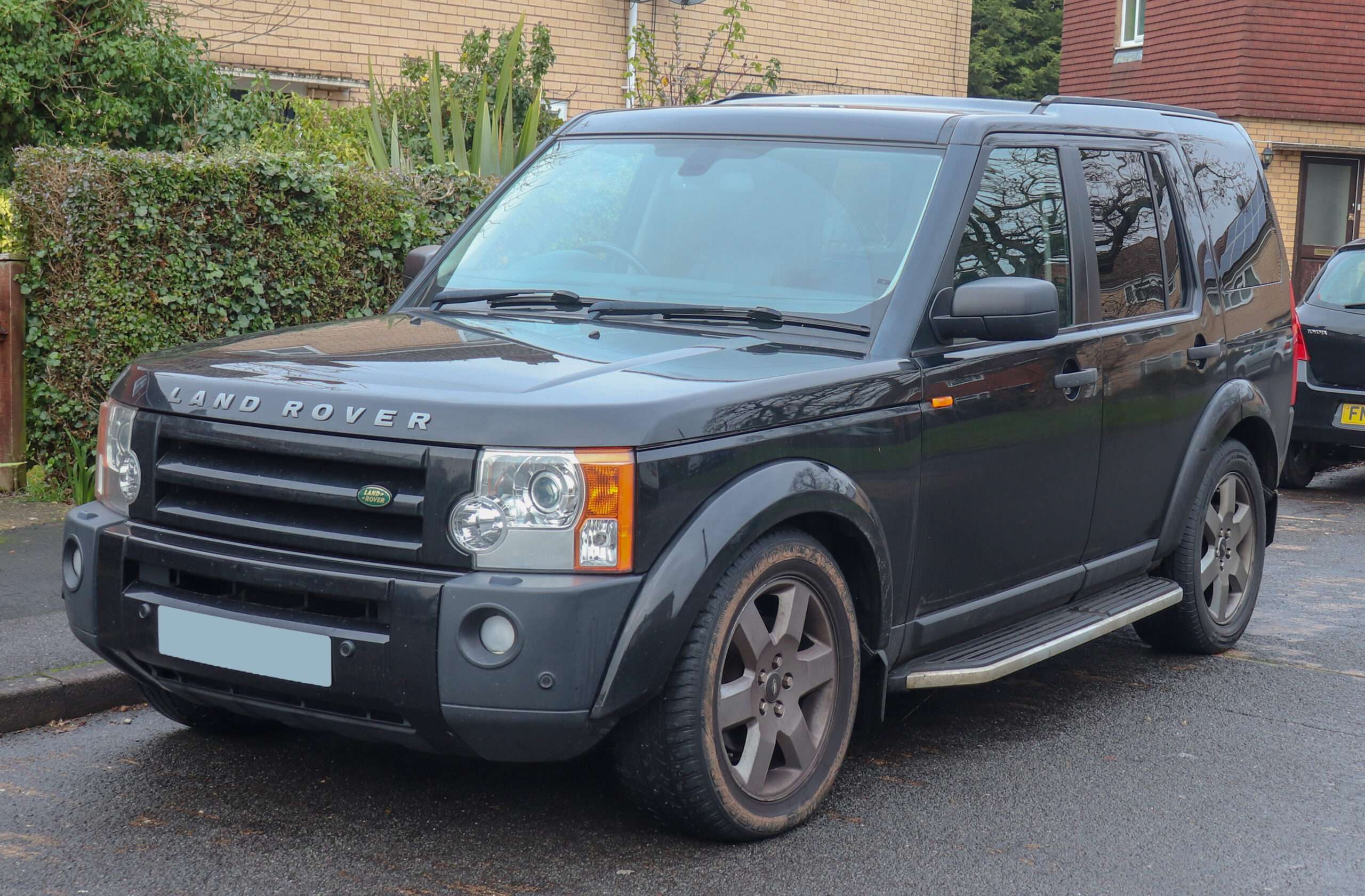
A Discovery 3 suspension, parking-brake or HDC warning needs a reader that can reach the system reporting it. An engine-only scan can be useful and still leave that warning unexplained. For regular ownership, GAP IIDTool G3 is our strongest specialist shortlist; iCarsoft LR V3.0 is a simpler standalone handheld candidate, subject to confirmation of the exact modules needed.
Choose the simplest supported setup for the question you actually have. A specialist report can be better value for a one-off difficult fault than buying and maintaining a workshop system.
Which Land Rover Discovery 3 2.7 TDV6 this guide covers
UK-market Discovery 3 L319 with the 2.7 TDV6 diesel, introduced in 2004 and replaced by Discovery 4 in 2009. Identify original build and model year, manual or automatic transmission, suspension type and optional equipment. Later registration does not turn a Discovery 3 into a Discovery 4. Excludes petrol versions, Discovery 4 and 5, modified diagnostic electronics and overseas specifications.
Use the VIN and original specification. A manual does not have the automatic-transmission controller covered in an automatic example. Air-suspension claims apply only to an air-suspended car. Confirm whether an electronically controlled rear differential is fitted before expecting its module. A tool maker’s model-year range describes coverage, not a complete UK sales specification.
Quick comparison by owner question
| Owner question | Information to seek | Practical limit |
|---|---|---|
| Suspension warning | Suspension-controller faults and confirmed supported data | Adds information beyond engine emissions. |
| Parking-brake warning | Parking Brake controller report | Reading is separate from release or calibration routines. |
| HDC, ABS or stability warnings | Braking/vehicle-dynamics and communication reports | Several warnings do not establish several failed parts. |
| Automatic gearbox or 4WD concern | Transmission, transfer-case and fitted rear-differential reports | Match the actual gearbox and equipment. |
Amazon affiliate link. As an Amazon Associate I earn from qualifying purchases – check compatibility thoroughly before purchases.
What generic OBD can still tell you
A compatible EOBD reader can retrieve supported emissions-related powertrain codes, readiness, freeze-frame and available standard live data. That is useful for an engine warning. Some transmission-related powertrain information can also appear; generic access should not be dismissed as useless. It does not, however, establish access to every fitted transmission, braking, body or chassis controller.
Check whether the report came from the generic OBD menu or a manufacturer-specific vehicle selection. A successful connection only proves the access actually achieved. A module that did not reply is different from a module reporting no faults, and neither result establishes the condition of a system that was never scanned.
Why several warnings need more than an engine scan
A Discovery 3 owner discussion starts with HDC, parking-brake, suspension and ABS warnings after the car had stood for a year. The owner asks for a reader that can reach those systems. Later replies mix reading, calibration and suggested repairs. The useful lesson is to define the reading task first; the thread does not establish one cause or universal tool compatibility.
Ask for a saved report identifying which controllers replied, which stored faults and which did not communicate. Preserve supply and communication codes alongside the warning details. A collection of lights does not prove each named system has independently failed, and a clean engine report cannot resolve the chassis warnings.
What documented suspension data can add
GAP’s functionality table, selected for Discovery 3 and 2007, lists suspension fault access and live-value entries including current height, gallery pressure and compressor temperature. These are examples from that selection, not a promise of every value on all builds. They can give a specialist more context than the dashboard warning alone.
A pressure reading needs its units, operating state and vehicle-specific information. We provide no universal pressure limit, compressor-time limit or calibration sequence. Reading a height value is different from commanding suspension movement. Do not go underneath an air-suspended vehicle or reproduce an unsafe fault to obtain a number.
Check parking-brake and drivetrain access separately
The same GAP selection lists Parking Brake, Transmission, Transfer Case and Rear Diff fault access. Its columns distinguish reading, live values, control and configuration. A fault-reading entry does not establish parking-brake live values or an unjam function. The rear-differential entry matters only where the equipment exists.
Give the supplier the actual controller and operation, such as reading a parking-brake report on a Discovery 3 2.7 TDV6 automatic. A useful answer identifies tool hardware, software and the required reading function. A general promise that a reader “does Land Rover” is insufficient.
Scanner options worth checking
| Route | Best fit | What to confirm |
|---|---|---|
| GAP IIDTool BT G3 | Regular ownership and detailed Land Rover-specific reporting | Exact platform/year, required modules, mobile device and licence conditions. |
| iCarsoft LR V3.0 | Standalone handheld reading without a phone or laptop at the car | Current exact-vehicle and module coverage; do not buy on reset counts. |
| iCarsoft LR V2.0 or V4.0 | V2.0 for confirmed reading needs; V4.0 for preferred screen/update workflow | A newer or more expensive model is useful only if it meets an evidenced need. |
| Generic EOBD reader | Supported engine/emissions questions | It is not proof of enhanced non-engine access. |
| Properly equipped Land Rover specialist | One-off complex diagnosis or unresolved communication | The actual vehicle, requested report and legitimate diagnostic setup. |
GAP’s current coverage table lists G3 for this generation. G4 is a different hardware generation, with adapter-related conditions on some older applications. Check the full package with the supplier and use an approved adapter where specified; this guide does not instruct changes to the vehicle connector. GAP also cautions that its detailed functionality table is being updated and may contain omissions or errors.
The iCarsoft LR V3.0 product documentation describes standalone operation and free updates. Its comparison presents LR V2.0 as a reading-focused alternative and LR V4.0 with touchscreen/Wi-Fi convenience. Broad product advertising is not exact-vehicle proof. Confirm the actual hardware, included Land Rover software, required module and specific reading task. UK listing feature counts differ from the manufacturer page, so they are not used as evidence of capability.
Phone, computer, updates and licences
IIDTool BT uses a compatible iOS or Android device. GAP currently specifies iOS 11 or later, or Android 8 or later with Bluetooth 4.0, and recommends a current stable operating-system release; not every Android device is guaranteed. Internet/USB firmware updating is separate from using the mobile app. Confirm the current updater and computer requirements before purchase.
GAP’s licence policy separates supported fault reading/clearing and live values from advanced VIN-licensed functions. Do not describe all reading as locked to one VIN. The BT package includes one VIN licence for relevant advanced functions; used-tool ownership and additional licensing need checking. This guide does not guarantee programming, coding, calibration or active-test support.
For iCarsoft, verify the serial-specific updater, supported computer operating system and USB/card-reader package. The manufacturer advertises free lifetime updates for these LR models; confirm genuine hardware and seller support. Do not assume a handheld updates through a phone or Wi-Fi simply because another generation does.
Love cool cars? Join Unusual Cars Club FREE!
Get forgotten motoring finds, stories, helpful car content and more.
Free to join. No spam. Unsubscribe whenever you like. See our privacy policy.
The legitimate JLR workshop route
JLR TOPIx provides an official access route for registered independent operators and subscriptions to technical information. At review it displays an SDD authentication-change notice effective 28 October. A technical-information subscription is not by itself confirmation of diagnostic software entitlement or a suitable interface.
For a workshop route, confirm the VIN-appropriate platform, current legitimate software entitlement, compatible operating environment, interface and task with JLR or a properly equipped specialist. Do not assume SDD, Pathfinder or a modern platform applies universally. Exact current setup has not been established here, so no DIY installation guide or copied-software bundle is recommended.
Save a useful first report
Record VIN/build identification privately, engine, gearbox, driven wheels, fitted equipment, warning wording, recent work and tool/software version. Save controller identity, full codes including suffixes, descriptions, status and available context before clearing. If only generic access was achieved, label the report accordingly. Ask specifically what was not covered.
A fault code is a direction for investigation, not a replacement-parts order. Clearing does not repair the cause and can remove evidence. Read, clear, live data, service routines, active tests and programming are six separate capabilities. No immobiliser, key-programming, security-access, brake-repair or suspension-calibration instructions are supplied. Seek appropriate help for symptoms affecting braking, steering, suspension or drive control.
Frequently asked questions
Will a basic reader explain a suspension warning?
Standard emissions access does not establish suspension-controller access. An enhanced reading route is needed for that specific task.
Does reading support prove calibration support?
No. Calibration is a separate capability and procedure. This guide does not promise it or provide its steps.
Which handheld should I shortlist first?
The LR V3.0 is the main standalone handheld shortlist here. A confirmed LR V2.0 may be sufficient for code reading, while the V4.0 adds interface/update convenience. GAP IIDTool G3 is the specialist alternative. Confirm Land Rover Discovery 3 2.7 TDV6 coverage by the exact controller and reading function rather than the brand name alone.
Related diagnostic guides
Browse all five Land Rover and Range Rover diagnostic scanner guides to find the right generation and engine.
Browse the car diagnostic scanner directory for the wider programme. Each vehicle guide has its own build and equipment limits.
Sources and review
Research reviewed: 31 October 2026. This is documentary research. Unusual Cars has not independently tested these vehicles, scanners or functions. Owner reports establish questions and reported experiences, not failure rates, confirmed causes or universal compatibility. Exact functions vary by vehicle build, fitted module, software, interface and tool version.
The GAP functionality and hardware table was reviewed using Discovery 3 / LR3, example selection 2007. Its broad entries require exact-build confirmation. See the version-specific IIDTool manuals, iCarsoft product and compatibility notice and official TOPIx access route. Model and owner references are linked beside the relevant discussion. Recheck product support and the final commercial destination before publication.
Amazon affiliate link. As an Amazon Associate I earn from qualifying purchases – check compatibility thoroughly before purchases.
Vehicle photograph: 2006 Land Rover Discovery 3 TDV6 Automatic 2.7 Front — Vauxford, via Wikimedia Commons (CC BY-SA 4.0). Resized and optimised for display; no content changes. Photograph remains available under CC BY-SA 4.0.