Affiliate notice: This guide contains affiliate links. As an Amazon Associate I earn from qualifying purchases.
For a Renault Wind, choose the diagnostic tool around the system you need to investigate. A compatible generic OBD2/EOBD reader can help with engine-emissions information. A roof, airbag, ABS or body-electrical question needs confirmed access to the relevant Renault controller. For a persistent roof warning, a properly equipped Renault or convertible-roof specialist may be a better first purchase than an unconfirmed handheld.
The Wind’s roof makes this a different scanner-buying question from a Twingo 133, even when the engine is related. A Renault badge on a tool is not proof it can report the folding-roof information you need. This is documentary research: Unusual Cars has not independently tested a Wind, scanner or roof function.
Which Renault Wind does this guide cover?
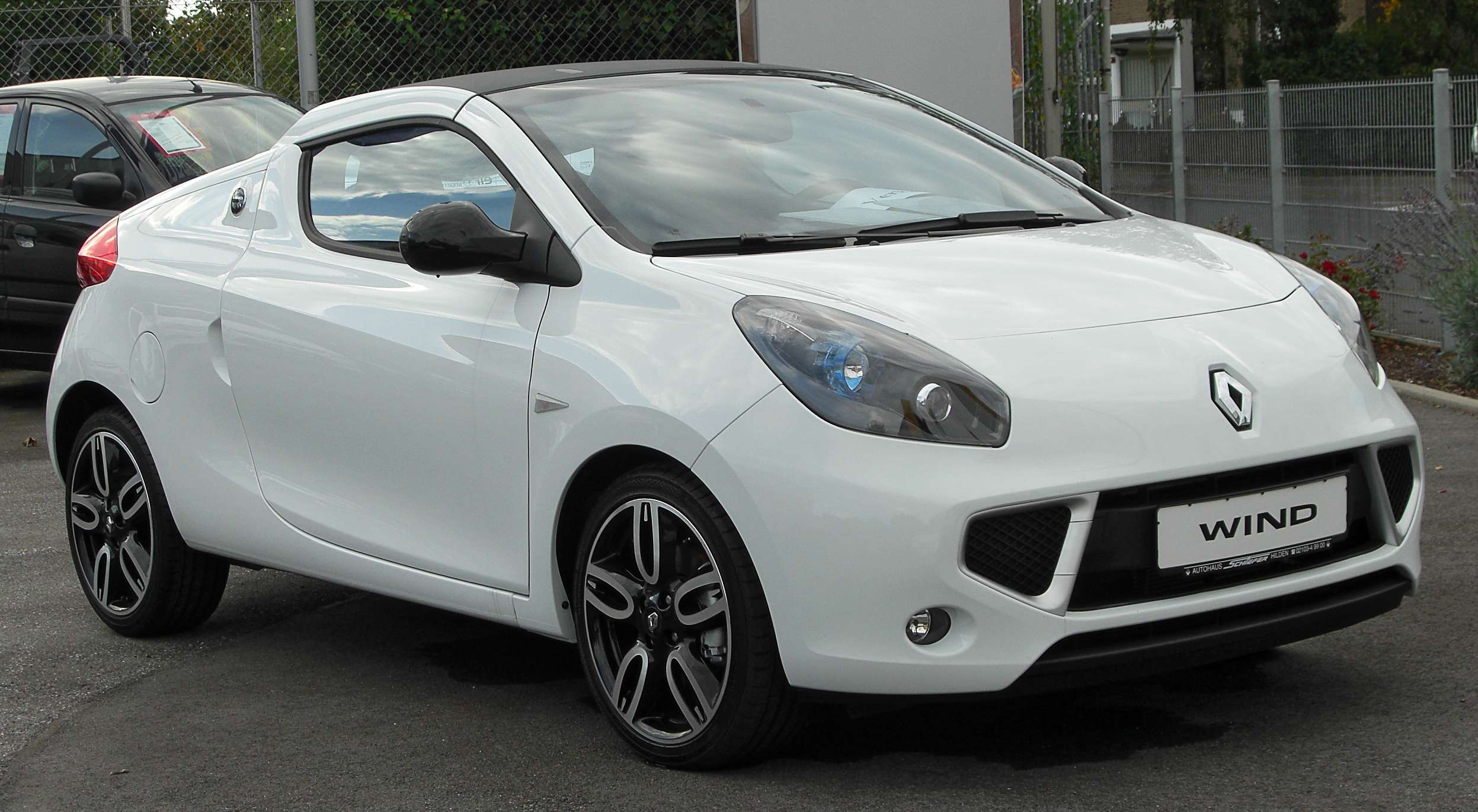
UK RHD Renault Wind two-seat, two-door rotating-hardtop road cars from the 2010–2012 UK range; identify later registrations by original build. 1.2 TCe 100 turbo petrol or 1.6 VVT 133 naturally aspirated petrol, five-speed manual. Include genuine UK trim and special-edition differences only with original equipment identified. Exclude Twingo hatchbacks, Clio, Megane CC, overseas/import specifications and materially modified roof, engine or control systems.
The period UK Renault brochure identifies both petrol engines and the electrically rotating hardtop. The 1.6 shares an engine relationship with the Twingo Renaultsport, but that does not transfer roof compatibility. Keep the real engine, build and fitted equipment with any coverage enquiry; trim names can differ across markets.
| Owner question | Route to investigate | What to confirm |
|---|---|---|
| Engine warning or emissions readiness | Compatible generic EOBD reader | The engine data the actual car exposes. |
| CHECK ROOF or incomplete roof operation | Wind-aware controller report or specialist | Exact roof controller and supported reading task. |
| Boot release or window/body concern | Relevant Renault body-system reporting plus inspection | A body menu is not proof of every switch-state display. |
| ABS or airbag warning | Confirmed ABS/SRS controller access | A clean engine scan does not assess these systems. |
Why a basic reader can miss the useful information
A generic scan normally answers an engine-emissions question. It can supply supported codes, readiness status and some recorded or live engine information. It does not become a roof or restraint-system report because it uses the same diagnostic socket. Some scanners offer separate generic and Renault menus; record which route produced the result.
If an engine-only app reports no codes while a roof warning remains, the result is incomplete for that complaint. Equally, an engine code found during a roof complaint is not automatically its cause. Keep the warning wording and the controller report together so a specialist can decide whether there is a relationship.
CHECK ROOF needs the Wind handbook and the right report
Renault’s Wind handbook distinguishes roof operating conditions from a roof fault and directs persistent CHECK ROOF messages to an approved dealer. That distinction matters before assuming a failed roof motor, controller or switch. This guide does not reproduce emergency roof movement or interlock-bypass procedures.
Record the exact message, whether the roof was fully closed or already part way through a cycle, and whether the windows and boot behaved normally. Describe what happened without repeatedly operating a mechanism that is behaving unexpectedly. A stationary photograph of the message and a written timeline can be more useful than a description such as “the roof is broken”.
Ask for a report identifying the roof controller, stored/current code status and any relevant data actually supported. A seller’s statement that a tool “does Renault” is too broad. Ask whether its Wind entry reaches the roof system on your build and whether the specific information can be read without commanding movement. A saved code is evidence to interpret, not an instruction to replace its named component.
A boot-release problem is not automatically a roof-controller fault
In a Wind owner discussion, the boot would not release after a wet period. The owner suspected a switch; the discussion did not establish a verified cause. It illustrates a useful question about body and opening-system diagnosis, not proof that water or a particular part explains another car’s fault.
The Wind handbook also treats roof position and luggage-compartment operation as related operating concerns. A diagnostician needs the actual state of both systems. Do not jump from a non-opening boot to a new body module, and do not assume a consumer scanner will display every latch or switch input. Mechanical inspection and electrical assessment may remain necessary even with a supported report.
What the iCarsoft reference really establishes
The FR V2 Renault reference list has a Wind entry with non-engine controllers and a category labelled Sunroof. That is useful evidence for a coverage enquiry. It is not a guarantee that a particular software version supplies every folding-hardtop code, position or repair routine on every Wind.
Use the model-specific label when asking about support, and describe the actual Wind roof rather than accepting a generic sunroof answer. Request confirmation of the current package, controller identity and code-reading or data function. If that cannot be established, keep the handheld recommendation conditional and use a properly equipped specialist for the roof complaint.
The 1.2 and 1.6 still need separate engine identification
Do not group the turbo 1.2 and naturally aspirated 1.6 into one engine diagnosis. Identify the original engine before choosing a Renault menu, interpreting live values or applying a fault description. A parameter available on one is not automatically supplied by the other.
For an airbag or ABS warning, request the appropriate system report regardless of engine. For an intermittent body concern, preserve the original report and recent battery/repair history without concluding that the battery caused it. Changed seats, aftermarket audio or earlier roof repairs are background information to pass on, not proof of a fault.
Compare complete diagnostic setups
| Setup | Device and connection | Best fit and limits |
|---|---|---|
| Generic reader, such as an Autel AL519-type unit | Standalone wired reader; confirm exact current package | Supported engine-emissions reading. Not proof of Renault non-engine coverage. |
| Genuine Renault-aware handheld, such as iCarsoft FR V2.0 | Standalone reading; package-specific PC/card-reader update route | Candidate only after model/controller/task confirmation. Wider FR models are not automatic compatibility upgrades. |
| Legitimate Renault CLIP through a specialist | Officially supported interface, Windows environment and access arrangements | Factory diagnostic context without an owner buying the whole setup; individual functions remain vehicle-dependent. |
The current FR V2.0 product page advertises a standalone handheld and free updates. Buy by the exact hardware model and supported software package, not the shape of the case or an old marketplace description. Confirm how that serial updates and whether a compatible PC or supplied card reader is required using the official update instructions.
The Autel generic-reader manual illustrates the engine/emissions route. A suitable multibrand enhanced reader is another candidate only where its exact variant and coverage match the task. Do not confuse generic OBD2 support with enhanced Renault access, or one product variant with another.
Legitimate Renault CLIP: hardware and access matter
Renault’s January 2026 applicability list places X33 Wind on CLIP BORNEO2. That is a platform route, not a guarantee of every reading or service function. Use the official ASOS offer and its current terms to check software access and subscriptions; an interface alone is not the complete system.
The May 2026 prerequisites specify the relevant interface and supported Windows environment. They identify Windows 11 and particular Windows 10 IoT LTSC editions, rather than a blanket promise for ordinary Windows 10, macOS or a phone. Match the current requirements to the actual configuration; a generic ELM327 or J2534 label is insufficient. Copied software bundles are outside this guide.
Get a report that helps the next decision
Start with the real build, engine, transmission and fitted equipment. Keep the symptom timeline, recent work and tool/database version with the scan. Preserve controller names, complete codes, descriptions, status and available context before clearing anything. Where a function is unavailable, record that limitation rather than presenting an engine-only scan as a complete vehicle check.
Distinguish a controller that replied with no stored faults from a fitted controller that did not reply, and from equipment the car never had. Codes and data narrow an investigation; they do not certify mechanical condition or identify a replacement part on their own. Safety-system faults and work beyond supported reading require appropriately qualified help.
Love cool cars? Join Unusual Cars Club FREE!
Get forgotten motoring finds, stories, helpful car content and more.
Free to join. No spam. Unsubscribe whenever you like. See our privacy policy.
Frequently asked questions
Is a Renault-aware reader worth buying for one fault?
Only if its confirmed coverage suits the task and the information will be useful. Compare the complete supported package with the cost and value of a targeted specialist report. A cheaper reader that only addresses the engine may still be enough for an engine-emissions question.
Does this guide promise code clearing, resets or active tests?
No. Reading, clearing, resetting, adapting and commanding a component are different functions. Exact write or service operations need their own vehicle-specific support and procedures. A warning disappearing after a clear does not prove that the underlying concern is repaired.
Will one scanner cover every version in this guide?
That is not established. Confirm the build, actual controller, software version and intended task. Family-level lists and broad product claims are useful leads; they are not a substitute for exact compatibility confirmation.
More Renault diagnostic guides
Browse all Renault diagnostic scanner guides or the main car diagnostic directory.
Compare Twingo II 133 for its separate hatchback scope, Mégane III 250/265/275 for the earlier manual RS, and Clio IV RS EDC for its different transmission application.
Compare related Renault guides: Laguna III Coupé · Mégane IV RS 280/300 and Trophy.
Sources and limitations
Research reviewed: 15 October 2026. Documentary evidence supports the qualified selection advice. Owner discussions identify questions, not fault frequency, verified causes or scanner capabilities. Exact functions can vary by build, module, software, interface and tool version. No independent vehicle or scanner testing is claimed.
Core references: Renault platform applicability; official setup prerequisites; FR V2 reference coverage; current coverage-check route. Model and owner references are linked beside the relevant discussion.
Photo: M 93 / Wikimedia Commons — Attribution permission (commercial reuse allowed). Original scene retained; resized for display.