For a UK 2013–2015 Forester SJ 2.0 XT Lineartronic, choose a Subaru-aware scanner and confirm transmission coverage as well as engine, ABS/VDC and airbag access. The iCarsoft JP V2.0 is a sensible handheld shortlist; a Foxwell NT530 Plus with Subaru software is an alternative. Neither a generic engine scan nor a broad “Subaru compatible” label proves access to the XT’s CVT fault memory or the particular live values you need.
Which Forester does this guide cover?
This guide covers the UK-supplied, pre-facelift SJ Forester 2.0 XT direct-injection turbo petrol with its original engine management and Lineartronic continuously variable transmission, within the 2013–2015 scope. The UK launch information attributed to Subaru identifies Lineartronic as standard on the XT. Confirm the car’s build and applied-model identity rather than selecting software solely from its registration year.
The reproduced Subaru UK 2015 update release distinguishes the XT turbo from the newly offered diesel Lineartronic. It also describes the interior changes while noting that the exterior remained largely unchanged. A 2015 infotainment update therefore does not, on its own, identify the later facelift or prove a change in diagnostic support.
Naturally aspirated petrols, diesel models, Japanese or other imports, the later facelift and SK/e-Boxer are outside this page. So are remapped or swapped controllers and powertrains. Older SG turbo Foresters also need their own guide: their gearbox and software assumptions should not be carried across to this SJ simply because both wear an XT badge.
Choose the tool around the job
| Your main task | Useful starting route | What to establish before buying |
|---|---|---|
| Occasional engine warning | Existing compatible EOBD reader or phone setup | Supported engine-emissions codes and data; do not mistake it for a complete vehicle scan. |
| Engine plus CVT, ABS/VDC and SRS reports | Subaru-aware handheld such as JP V2.0 or NT530 Plus with Subaru software | The exact UK turbo/CVT build, named controllers and required operations. |
| A live CVT fluid-temperature display | A documented tool/app and parameter combination | Explicit support for this transmission value on your UK XT; coolant or engine-oil readings are different. |
| One-off transmission, brake or airbag concern | Subaru-capable diagnostic specialist | Reports from the relevant systems and a record of any controller the equipment could not reach. |
For repeated ownership use, a handheld that reaches the required Subaru controllers is more useful than buying several engine-only readers. For a single unresolved warning, a properly scoped specialist scan may be the better first purchase. A long list of reset icons is less helpful than a current answer about the particular controller and information you need.
Why shortlist the iCarsoft JP V2.0?
The manufacturer’s JP V2.0 page describes a standalone handheld, with database updates through a PC/card route. The Subaru V11.10 reference chart lists Forester through 2018 and shows diagnostic categories including engine, transmission, brakes and SRS. That is useful manufacturer-aware evidence, but it is an aggregate chart rather than a UK 2.0 XT year-by-year list of individual parameters.
Treat JP V2.0 as a shortlist, conditional on the seller or official coverage route confirming your build and tasks. Ask specifically about the Lineartronic transmission controller. If temperature display is essential, name CVT fluid temperature separately. A TCM entry with “live data” does not identify which values are available. Check the actual unit, installed Subaru database and update/support arrangements supplied.
The Foxwell alternative
The official Foxwell catalogue was checked under SUBARU, Europe, Forester and the separate 13MY, 14MY and 15MY selections. Each returned NT530Plus and NT530. This gives a useful year-and-region shortlist, but the reviewed results did not resolve turbo versus other engines, each fitted controller or the CVT temperature parameter.
If comparing the NT530 Plus, specify the Subaru manufacturer software and ask for the same controller/function checks. Its broad catalogue function label is not a guarantee of adaptations, calibration, output tests or coding on your XT. Choose on documented coverage and support for your task rather than assuming the more extensive marketing description settles it.
Engine OBD and a Lineartronic scan answer different questions
Standard engine-emissions diagnostics can provide supported codes, status, available freeze-frame information, readiness and live values. Save that initial report before clearing anything. It is useful evidence, but it does not establish that the scanner has queried the transmission, brakes or restraint controller.
Ask a Subaru-aware tool to identify and report the relevant fitted systems. A transmission report should retain the complete code, description, status and controller identity where available. Record an unsupported system or failed communication attempt too. “No faults reported”, “system unsupported” and “no communication” are different results; none should be silently converted into an all-clear.
The OBDLink diagnostics documentation separates standard access, manufacturer parameters and enhanced module diagnostics. It also cautions that its enhanced add-ons are primarily for North American vehicles. A Subaru parameter menu in a phone app does not by itself establish UK XT TCM, ABS or SRS fault access. Check the adapter, app, operating system and exact vehicle support together.
Can it show CVT fluid temperature?
Put that exact question in the purchase specification. Engine coolant temperature, engine oil temperature and CVT fluid temperature describe different things. A temperature gauge working on an engine screen is not evidence that the transmission value is supported. Likewise, a generic “AT data” claim needs to be tied to the actual XT Lineartronic controller and current software.
A useful example of the limits is COBB’s CVT temperature-monitor release. It explicitly names US-market Forester XT model years and a particular Accessport/firmware combination. That shows why market, year and software matter; it does not establish compatibility with a UK car or make a tuning device the recommended diagnostic purchase here.
Ask the supplier for the parameter name, the supported application and any software requirement. If it cannot confirm the value, buy only for the functions it can substantiate or use a specialist with documented coverage. This guide provides no fluid-level procedure, temperature window for servicing, adaptation reset or gearbox learning routine. A live number does not diagnose the transmission’s mechanical condition.
Why do several warnings appear when an engine reader finds nothing?
A 2015 Forester owner report describes AT OIL TEMP, ABS, hill-start and traction warnings with no codes shown by a basic reader. Its engine and market are unspecified, so it is a question-discovery example rather than proof of a UK XT fault. The useful lesson is to establish which systems were actually scanned before interpreting the result.
Keep the warning combination, whether it was steady or flashing, and the conditions in which it appeared. Follow the relevant vehicle handbook and obtain appropriate professional assessment. Do not infer a failed valve body, sensor or complete gearbox from a cluster of lamps, and do not buy a reset tool as a substitute for the underlying investigation.
ABS/VDC, SRS and X-Mode need the right scope
For a brake or stability warning, request coverage of the fitted ABS/VDC controller. Fault reading, wheel-speed data, an output test and a calibration routine are separate capabilities. For an airbag warning, ask for an SRS report rather than accepting a clean engine result. The presence of an airbag or brake menu does not certify every function on the car.
Subaru’s fourth-generation engineering release describes X-Mode as coordinated control involving engine, transmission and VDC. It should not be treated as proof that an aftermarket scanner must find a separate “X-Mode ECU”. Give the actual warning or unavailable feature to the specialist and request the relevant controller reports. Overseas EyeSight, body-system or equipment listings must not be assumed to describe a UK XT’s fitted systems.
Keep previous steering, brake, restraint, battery and drivetrain work in the history supplied with the car. That context can help an investigation; it does not identify a failed part. Brake, airbag and unexplained drivetrain concerns need suitable professional diagnosis rather than undocumented resets or calibration attempts.
Love cool cars? Join Unusual Cars Club FREE!
Get forgotten motoring finds, stories, helpful car content and more.
Free to join. No spam. Unsubscribe whenever you like. See our privacy policy.
Can hesitation be blamed on the CVT from a scan?
A scanner is one source of evidence. In an overseas XT ownership discussion, owners describe drivability concerns and uncertainty over engine versus transmission causes. Those reports do not establish a repair for this UK application. Record when the hesitation happens, the warning state, prior work and any modifications, then have the relevant engine and transmission information assessed together.
A stored code is a starting point, not a parts order. Equally, no stored engine code does not certify the CVT, turbocharger or engine as mechanically sound. A pre-purchase scan should accompany a suitable inspection and history review. Readiness information also needs context: an incomplete monitor alone does not establish that a seller concealed a fault.
Is FreeSSM suitable for this SJ?
Do not carry an older Forester cable recommendation into this purchase. The reviewed FreeSSM help describes legacy model-year and interface support, including qualifications around 2010, and engine/transmission access. It does not establish this 2013–2015 SJ application or whole-car ABS/SRS coverage. This is a documentary support limit, not a claim that every CAN-equipped Subaru is impossible to diagnose with all legacy software.
A generic ELM-style adapter, a legacy serial interface and a modern manufacturer-aware scanner are not interchangeable simply because they plug into a diagnostic socket. For this guide’s engine/CVT/brake/airbag task, start with a documented supported route rather than buying a cable on the basis of an SG-era forum post.
What to ask the scanner supplier
“I have a UK-supplied pre-facelift Forester SJ 2.0 XT petrol turbo, [confirmed build/model year], with the original Lineartronic CVT and engine ECU. I need engine, transmission, ABS/VDC and SRS fault reports, plus [name any required live value]. Can this exact hardware and Subaru software reach those controllers? Can it specifically display CVT fluid temperature, and what remains unavailable?”
Include any known remap, replacement controller or drivetrain change. Ask about update requirements, the software supplied, documentation, seller support and return arrangements. Save the reply. Coverage should relate to the job you intend to do, not just the word “Forester” in a catalogue.
Preserve a useful report
- Use the vehicle and scanner instructions for connection and power requirements; operate the device while stationary.
- Save the first report with controller names, full codes, status and available operating context.
- Record systems the tool could not access, rather than counting them as fault-free.
- Avoid clearing evidence before diagnosis, and keep mechanical, brake and restraint assessment with an appropriately equipped specialist.
Reading codes, clearing codes, live data, output tests, calibration, coding and programming are different operations. Exact functions can vary by vehicle build, module, interface and tool/software version. No active-test, calibration, programming or security-access capability is guaranteed or instructed here.
Related Subaru guides
Browse the Subaru diagnostic-scanner hub or main OBD directory. The 2006–2008 Forester SG 2.5 XT scanner guide covers an earlier vehicle scope; its gearbox and software advice must not be transferred to this SJ.
Sources and review
Reviewed 28 October 2026. This is desk-researched guidance based on vehicle release material and manufacturer/project documentation. Owner discussions identify questions and retain their scope limits. Unusual Cars has not independently tested this vehicle, scanner or function.
- Subaru 2013 UK launch summary, attributed to Subaru
- Subaru UK 2015 update release, reproduced
- Subaru fourth-generation launch engineering release
- iCarsoft JP V2.0 manufacturer product page
- iCarsoft Subaru V11.10 reference diagnostic chart
- iCarsoft official vehicle coverage route
- Foxwell live European Forester year catalogue
- Foxwell NT530 Plus manufacturer page
- OBDLink manufacturer diagnostics guide
- COBB CVT temperature monitor release
- FreeSSM official help
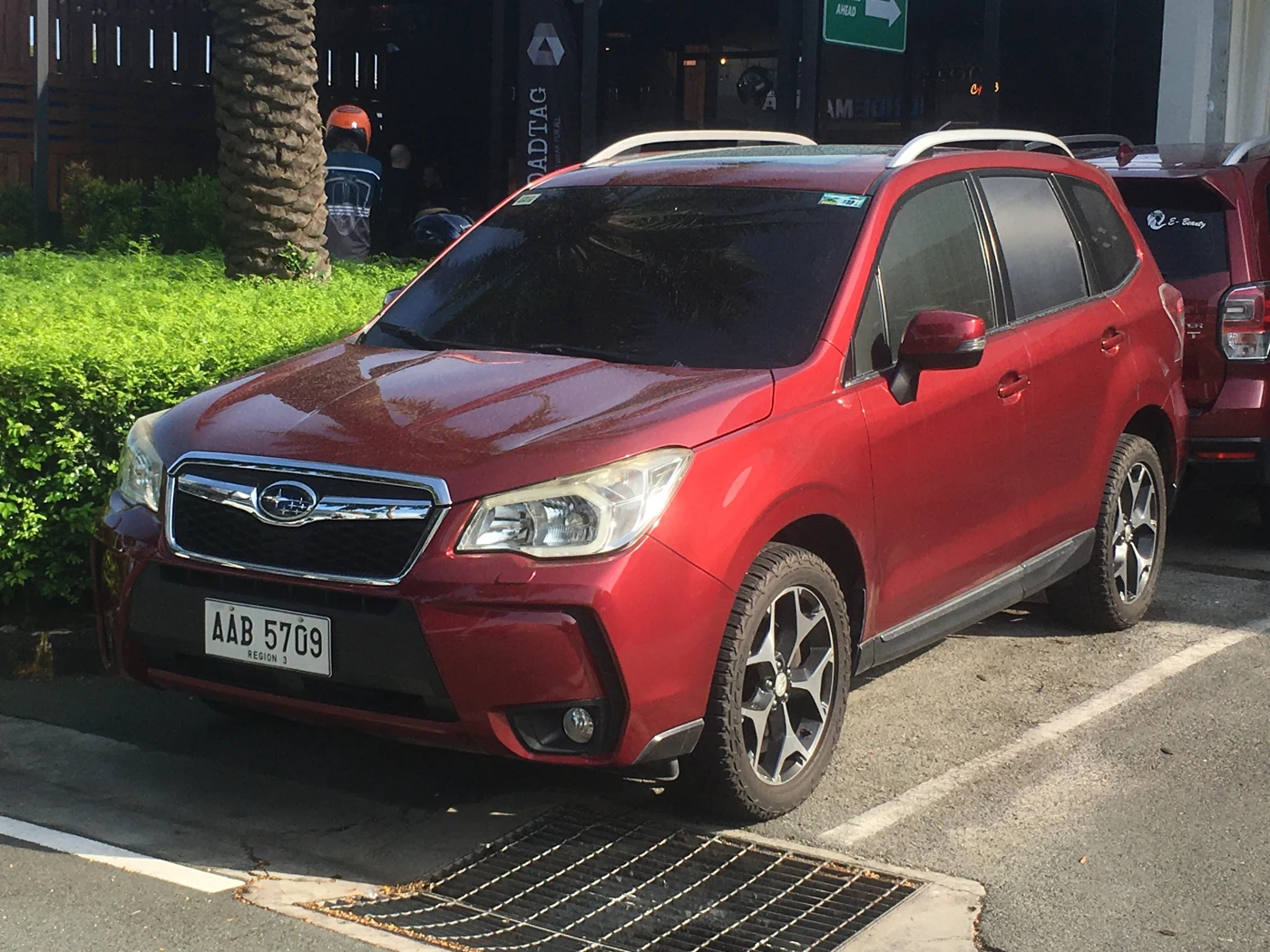
Illustrative Philippine-market 2014 pre-facelift Forester SJ 2.0 XT. Photo: Ethan Llamas, Wikimedia Commons, CC BY-SA 4.0. Proportionally resized and converted to WebP under the same licence; natural background retained. UK equipment and diagnostic coverage checked separately.