
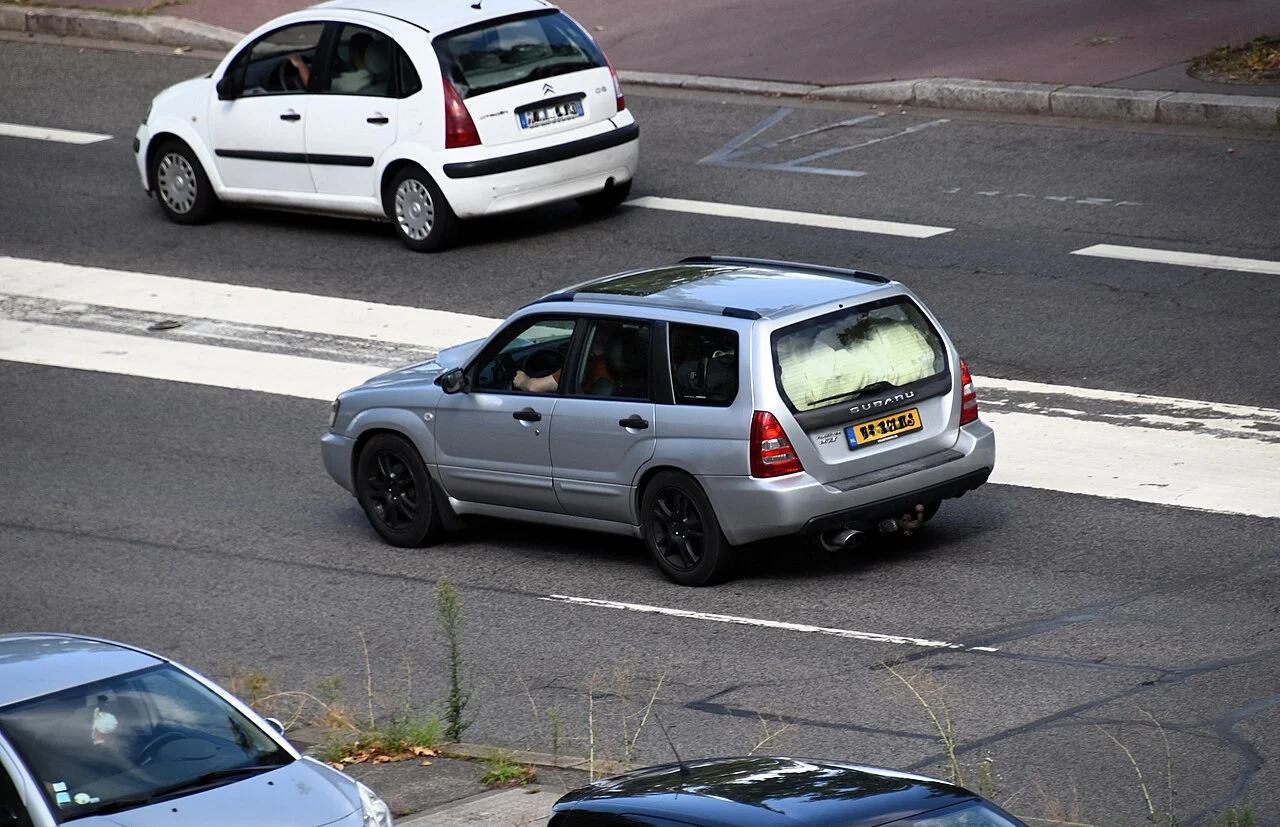
For the UK pre-facelift Forester SG 2.5 XT manual, shortlist a Subaru-aware handheld such as the iCarsoft JP V2.0 and verify engine, ABS and airbag coverage separately. This is the short pre-facelift application introduced in autumn 2004, not the later 2006–2008 facelift car. A North American “2004 XT” listing or an automatic-transmission menu is not enough to establish a match.
The short pre-facelift 2.5 XT scope
This guide covers the UK-supplied SG Forester 2.5 XT turbo five-door in its pre-facelift, MY2005 baseline, with the original engine, ECU and five-speed manual gearbox. Its autumn-2004 introduction explains the 2004–2005 date range in the title. Confirm the build and applied model: a calendar-year 2005 registration can sit near a model change and must not automatically be assigned to this guide.
Subaru’s European launch specification identifies the 2.5-litre turbo model and five-speed manual. It also places the European introduction in autumn 2004. That period evidence is a stronger scope reference than a modern listing which groups every SG XT together.
The scope excludes the 2.0 XT, the later facelift 2.5 XT, overseas automatic versions, Japanese STI and other imports, PPP/remapped cars, standalone management, engine or drivetrain swaps and competition conversions. The Canadian 2005 brochure includes an automatic in that market; it does not expand this UK manual guide. Ask about the actual car rather than selecting an overseas profile to obtain more menu options.
Which scanner is the best starting point?
| Tool and configuration | Best fit | Device/setup | Important limit |
|---|---|---|---|
| iCarsoft JP V2.0 with Subaru software | Main Subaru-aware owner shortlist | Standalone handheld; check computer requirements for updates | Confirm exact UK build, engine, ABS and SRS code/data access. This scope is five-speed manual. |
| iCarsoft TYT V1.0 with Subaru software | Budget alternative to compare | Standalone handheld; smaller display | Compare current price, supplied software, update support and the particular controllers required. |
| Subaru specialist using suitable legitimate SSM equipment | A module, warning or data request the owner tool cannot document | Workshop equipment and a vehicle-specific report | Confirm support for the older UK SG and required system when booking. |
| Compatible generic EOBD reader or app/interface combination | A limited emissions-related engine check | Handheld, or a compatible phone/laptop and interface | Useful for supported engine information; not proof of ABS, SRS or wider Subaru-controller access. |
The JP V2.0 is our preferred documentary handheld shortlist for owners wanting Subaru-aware access beyond an engine-only reader. The manufacturer describes a 4-inch display and free lifetime updates. Check the supplied hardware/software version, update computer requirements, support and returns before ordering. Unusual Cars has not independently tested it on this Forester.
The iCarsoft Europe Subaru function sheet includes Forester and lists engine, transmission, ABS and SRS diagnostic categories. It does not map every row to an early UK SG year or controller. Request confirmation for the fitted systems and the task you need. Code reading, fault clearing and live data are separate questions; a tick in a Subaru-wide list does not settle all three.
The TYT V1.0 includes Subaru in its product coverage and has a 2.8-inch display. It is the budget comparison rather than a generic reader as the only cheaper route. JP V3.0/V4.0 upgrades need a documented additional benefit for this exact car. The JP V3.0 Subaru coding table starts at 2014, so it does not support a coding promise for an early SG. Do not pay for headline functions that have not been established on your application.
What to ask for on this five-speed manual
| System | Information to request | Coverage boundary |
|---|---|---|
| Engine ECU | Supported Subaru-specific codes and live values, alongside standard emissions information | Confirm the original UK pre-facelift ECU/software identity. |
| ABS | Fault codes and any specific live information needed for the warning | A tool reading the engine does not establish brake-controller access. |
| SRS | Codes from the actual restraint controller | A fault description does not authorise restraint repair or active tests. |
| Other fitted equipment | The actual controller and task, identified by vehicle/build | Do not inherit later SG, STI or overseas equipment from a family-wide list. |
This manual application does not need a recommendation built around an automatic TCM. A broad scanner chart may include transmission, DCCD, later driver-assistance or service-function categories. That does not mean the UK pre-facelift XT has each system or supports each operation. Keep a list of the actual fitted controllers and the warning you are investigating.
A 2005 registration is not enough to select the later guide
Match the original market, build and applied model before using a compatibility result. A facelift appearance, replacement front end or engine swap can make visual identification misleading. If the seller’s scanner list spans 2004–2008 without separating engines, gearboxes or controller revisions, ask for a narrower answer. An unconfirmed answer should remain unconfirmed, rather than becoming a guarantee or an unsupported “not compatible” claim.
What a generic EOBD reader can still tell you
On a compatible car, standards-based engine diagnostics can retrieve supported emissions-related codes, standard live values, available freeze-frame and readiness information. That is useful for establishing a starting point for an engine warning. It is not the same as a scan of all Subaru controllers, and “no engine codes” does not explain a separate ABS or airbag warning.
Save the full code, status and available operating conditions before clearing anything. An abbreviated scanner description names a detected condition, not a confirmed failed component. Do not confuse an older two-digit blink-code list with a full OBD code, or replace a part solely because its name appears on screen.
FreeSSM and laptop alternatives
FreeSSM is a separate engine/transmission route for owners comfortable matching software and interfaces. Its official project description covers engine and transmission control units. The reviewed interface help includes Forester in its stated model range and specifies compatible K/L pass-through interfaces selected through a serial or virtual serial port. The reviewed help says ELM interfaces will not work with that route. An ELM-based phone app and a FreeSSM cable are therefore different purchases.
The project lists Windows and Linux platforms; check the requirements of the actual release and driver before buying a cable. Do not assume an old packaged download, current development build and every USB adapter have identical support. Use the project documentation and legitimate distribution route. The documented engine/transmission scope does not establish ABS or SRS access on this manual XT.
RomRaider is an engine logging and tuning project, dependent on compatible ECU definitions and interfaces. It is not evidence of whole-car diagnostic access. This guide provides no ECU-writing, boost-adjustment, emissions-disable, immobiliser or key-programming workflow. A logging option should not become an invitation to experiment with an unverified calibration.
Questions earlier XT owners ask
The seller says it only needs a turbo solenoid. Is a scanner enough?
Request the complete code and diagnostic report, the conditions when the warning returned and the car’s modification history. The UK XT buying discussion raises this exact kind of seller claim. It does not prove that a solenoid is the failed part on another XT. A scan can help frame an independent inspection; it cannot establish repair cost or make an unresolved fault safe to ignore.
Can I use the standard guide if the car has a Prodrive pack?
Treat the calibration history as material. The period Forester PPP announcement describes a reprogrammed ECU and exhaust changes. A factory-backed or period package can still sit outside a standard-ECU diagnostic assumption. Tell the specialist what is fitted; a badge or missing paperwork cannot verify the installed map. This guide offers no tuning or conversion procedure.
Can an engine scan rule out a mechanical problem?
No. A car can need mechanical investigation even when the selected menu reports no stored engine codes. Describe the actual symptoms and preserve the report rather than using it as a certificate of condition. Clutch, transmission or engine concerns on a manual XT require the appropriate assessment; buying a scanner does not replace it.
Love cool cars? Join Unusual Cars Club FREE!
Get forgotten motoring finds, stories, helpful car content and more.
Free to join. No spam. Unsubscribe whenever you like. See our privacy policy.
A useful first scan and workshop handoff
- Record the original market, build/applied model, engine, gearbox and known modifications before selecting a vehicle profile.
- Follow the exact vehicle and tool connection/ignition instructions. Do not bridge pins or join loose under-dash connectors from an unrelated forum recipe.
- Use the scanner while stationary and save the full report, code status and available freeze-frame. Do not handle a phone, scanner or laptop while driving.
- Ask for the controller relevant to the warning. Record which systems could not be accessed, rather than describing the result as “no faults”.
- For brake, restraint or significant drivability concerns, obtain appropriate diagnosis. Do not repeatedly erase warnings to judge whether the car is repaired.
A Subaru dealer or suitably equipped independent specialist is the practical route when the required access cannot be documented. Subaru Select Monitor is the manufacturer diagnostic reference, but confirm that the workshop’s actual installation and interfaces support the older UK car and the particular module. Ask for a saved report and an explanation of what was read.
Capabilities this guide does not guarantee
Reading codes, clearing memory, displaying live data, running active tests, resetting service items, calibrating, coding and programming are separate functions. No particular active test, calibration, programming or security operation is promised here. Exact functions can vary by vehicle build, module, software, interface and tool version. This is documentary research; Unusual Cars has not independently tested this vehicle, scanner or function.
Related Subaru scanner guides
Browse the Subaru diagnostic-scanner hub and the main OBD directory. Owners of the later build should use the separate 2006–2008 facelift Forester SG 2.5 XT scanner guide, with its own gearbox and equipment checks.
For the other earlier XT application, read the separate Subaru Forester SG 2.0 XT Scanner Guide (2002–2005). Check its engine, gearbox and original-market boundaries before using it.
Sources and review
Reviewed 26 October 2026. Manufacturer and software-project documents support the product and software descriptions. Period launch material and UK model references define the intended scope. Overseas brochures are kept distinct. Owner discussions identify questions only; their diagnoses and repair suggestions are not transferred to these UK cars.
- Subaru European 2.5XT launch specification, August 2004
- RAC UK Forester 2002–2008 model history
- Period UK pre-facelift 2.5XT review
- Subaru Canada 2005 Forester brochure
- iCarsoft JP V2.0 manufacturer documentation
- iCarsoft Europe Subaru V11.10/V11.15 function list
- iCarsoft TYT V1.0 manufacturer documentation
- iCarsoft JP V3.0 manufacturer documentation
- FreeSSM official project
- FreeSSM official interface and vehicle help
- RomRaider official project
- Subaru Select Monitor III launch
- Owner question: UK2.0/2.5XT and engine warning on a car for sale
- Reproduced Subaru/Prodrive Forester 2.5 XT PPP announcement, May2005
2005 pre-facelift Forester 2.5 XT, photographed in France. The image does not verify an original UK ECU or modification history. Photo: Charles (usf1fan2) / Wikimedia Commons, CC0 1.0. Proportionally resized and converted to WebP; no content changes.


