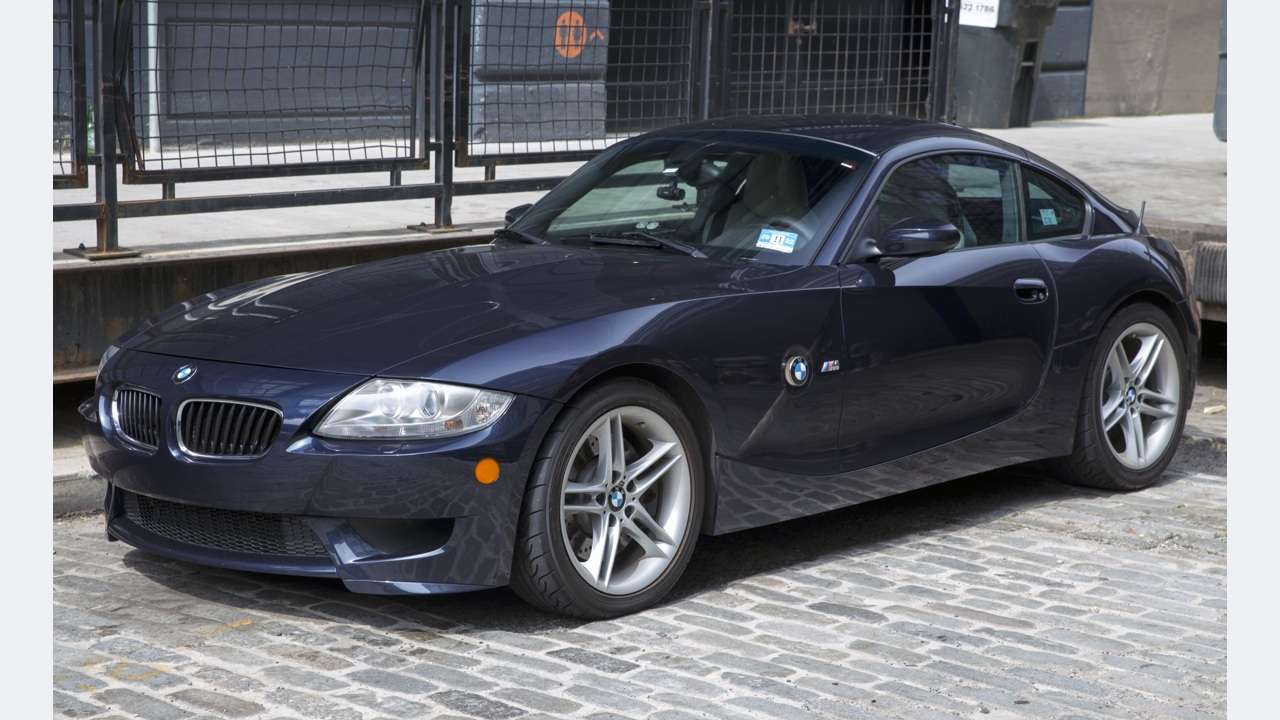
The Z4 M Coupé looks related to an ordinary E86, but its S54 engine and MSS70 management change the scanner-buying question. It also predates the Z4 range currently listed by BimmerLink. Choose around this exact M Coupé rather than buying an adapter because it works on a newer Z4 or an E46 M3.
This is a documentary buying guide. Unusual Cars has not independently tested this vehicle, scanner or function. Exact access varies by build, controller, vehicle software, interface and tool version.
Advertisement: This guide contains Amazon affiliate links. As an Amazon Associate I earn from qualifying purchases.
Quick scanner choice
| Your question | Sensible first route | Important limit |
|---|---|---|
| Engine light or emissions code | Compatible generic EOBD reader | Engine baseline; preserve the original report |
| S54 engine context | BMW-aware handheld with confirmed E86 M/MSS70 coverage | E46 M3 support is not proof of this controller |
| DSC, restraint or body warning | Confirmed coverage of the fitted E86 M controller | Generic engine access cannot establish chassis/body status |
| Unresolved symptoms or mechanical noise | BMW specialist and appropriate inspection | A clear scan cannot certify VANOS or other mechanical parts |
Three checks before buying
Which Z4 M does this guide cover?
This guide covers UK fixed-roof E86 Z4 M Coupés in the selected 2006–2008 range, with the naturally aspirated S54 3.2-litre petrol six, rear-wheel drive and factory six-speed manual. The BMW UK Z4 M Coupé launch and BimmerWorld chassis and engine table identify the M Coupé specification.
The E85 M Roadster is excluded from this article, as are ordinary 3.0si/N52 and other non-M Z4s, E89/G29 generations, imports, engine swaps and materially modified electronics. Roadster roof faults and some tightly dated Roadster bulletins need their own coverage. An E86 body label alone does not identify the engine.
Why the engine controller matters
The exact E86 S54 row in RPM Motorsport E86 S54 controller application table identifies MSS70 management. The supplier’s general introductory wording groups several Z4 engines together, so the model-specific row is the relevant evidence here. This link supports controller identity, not a recommendation for its programming service.
The E46 M3’s S54 reputation does not make its controller menus or code translations interchangeable with those in the Z4 M. Ask a scanner seller specifically about E86 Z4 M/S54 MSS70. “Supports S54” without the chassis and controller can leave an important gap.
What generic OBD2 can and cannot answer
A compatible generic reader can provide supported engine-emissions faults and available freeze-frame or live values. It is useful for keeping the initial evidence when an engine warning appears. It does not establish DSC, restraint, climate or other body-controller access.
An emissions scan returning no faults has not answered a chassis-warning question. Equally, a reported code needs the full description and context rather than a generic web lookup. Record whether the tool actually communicated with each relevant controller.
S54 VANOS questions: preserve the timing context
The introduction to Beisan Systems S54 VANOS technical evidence explicitly includes the E86 Z4 M’s S54 and identifies variable timing on both intake and exhaust sides. Timing-related symptoms need that engine-specific context. BMW-aware fault wording and any supported position information can help a specialist interpret the report.
The code list on a specialist’s E46-titled page is not automatically an MSS70 code-conversion table. We therefore do not copy its older BMW decimal or hexadecimal mappings into this guide. Exact Z4 fault wording and parameter availability must come from the actual report and confirmed coverage.
Mechanical noise or hesitation can need inspection even with a clean scan. No consumer reader can certify the condition of VANOS hardware simply by returning no codes. The guide includes no timing adjustment, disassembly or active-test instructions.
Two tempting bulletins that do not prove a Coupé repair
BMW’s BMW SIB 11 02 08,November 2012 lists an E86 application with the N52 engine. That is not this S54 M Coupé, so its VANOS-solenoid remedy should not be presented as the Z4 M answer. Both cars being E86 does not remove the engine limitation.
Separately, BMW SIB 12 08 06 roadster-only bulletin covers a narrowly dated E85 M Roadster situation. Its tank-ventilation software explanation is not proof of the same cause on an E86 Coupé. These examples show why chassis, engine, production dates and symptoms all need to match before a bulletin is used as a diagnosis.
DSC warnings need a chassis report
If your concern is a DSC or ABS warning, select a tool with confirmed access to the fitted Z4 M chassis controller. Ask for the exact fault description and any available related signal context. A normal-looking generic engine report cannot clear that concern.
Several warning lights do not prove that one expensive control unit has failed. Preserve the reports together and have braking or stability concerns assessed appropriately. This article does not instruct steering-angle calibration, brake activation or restraint-system work.
The Variable M differential and manual gearbox
The BMW UK launch material describes the Variable M differential’s internal pump-and-clutch arrangement and the six-speed manual. Do not assume later electronically controlled Active M Differential menus belong on this car.
This also means that automatic gearbox adaptation or M DCT functions are not useful purchasing promises for a factory E86 Z4 M Coupé. A clutch, gearbox or differential noise needs mechanical assessment; the absence of a fault code is not evidence that those components are healthy.
A BMW-aware handheld is the sensible first comparison
The iCarsoft BMM V3.0 documentation advertises E-family BMW coverage and is a credible handheld candidate. Obtain confirmation for the Z4 M E86/S54 MSS70, plus the actual DSC, restraint and body systems you need. The cabin 16-pin connection and a broad “BMW” label do not establish complete access.
The manufacturer advertises lifetime free software updates. Check the supplied cable, update process and current coverage version. A service-function menu is not a guarantee that every reset or test is available here. Our iCarsoft BMM V3.0 guide sets out the checks.
Why BimmerLink is not recommended for this generation
The BimmerLink supported vehicles lists Z4 support from 2009 onwards. The 2006–2008 E86 M Coupé falls outside that published range. A compatible adapter does not change the app’s vehicle coverage, and an E46 M3 report is not proof that it will work here.
For this article, both approved commercial placements use the iCarsoft BMW search. Our BimmerLink adapter guide can help owners of eligible cars, but should not be read as an E86 recommendation.
OBDeleven also needs an exact older-model answer
The OBDeleven vehicle support excludes pre-approximately 2008 vehicles and says most later E-series cars are supported. That wording does not establish E86 M Coupé compatibility, even for a 2008 car. We have not confirmed this exact application and do not recommend it as the default route.
For a manufacturer-confirmed eligible BMW, OBDeleven Advanced Diagnostics distinguishes the OBDeleven app and NextGen 2/3 hardware from first-generation VAG equipment. Optional paid features and VAG coding claims do not solve the E86 compatibility question. Buy against an exact model and controller answer, not the latest BMW advertising.
A scanner report is a starting point
Save the original report before clearing anything. Keep the controller name, full code and description, present or stored status, and any available mileage, freeze-frame or environmental information. Record what you noticed: a cold start, warm restart, warning light or hesitation. A photograph of the dashboard message is useful alongside the scan.
A report saying a controller did not communicate is different from that controller reporting no faults. Ask whether the tool actually supports it on your build. Fault history, a missing module and a clean engine scan should never be bundled into one reassuring “all clear”.
Do not repeatedly clear warnings to see whether the car appears better. That can remove useful evidence without resolving the underlying issue. Follow the handbook if a warning requires stopping or assistance. Brake, restraint and serious engine warnings need appropriate professional assessment.
When a BMW specialist makes more sense
For a one-off unresolved warning, a specialist report can be better value than buying several incompatible tools. Ask for a vehicle-wide scan with the engine and relevant chassis or body controllers identified, an explanation of current versus historical faults, and the next evidence needed before replacing parts.
Love cool cars? Join Unusual Cars Club FREE!
Get forgotten motoring finds, stories, helpful car content and more.
Free to join. No spam. Unsubscribe whenever you like. See our privacy policy.
The legitimate manufacturer software route is BMW’s BMW AOS, with current account permissions, paid access where required and an appropriate interface. Its BMW AOS technical requirements currently specifies supported Windows 10/11 Pro or Enterprise 64-bit systems and recommends ICOM Next or suitable J 2534 hardware; Bluetooth passthrough is excluded. Older-model coverage, application availability and the actual connector arrangement need separate confirmation.
A generic USB cable, a downloaded software bundle or a phone adapter is not proof of complete BMW workshop access. Historical DIS or INPA references help explain old diagnostic reports, but they are not an endorsement of copied software packages. This guide does not provide installation, programming, security-access or calibration instructions.
Before buying: ask these questions
Give the seller the exact model, build date, engine and the warning you want to investigate. Ask which fitted controllers can be read, whether the relevant fault descriptions and supporting values are available, and which adapter, vehicle software selection and update version are needed. Obtain a model-specific answer rather than relying on a large compatibility logo.
Compare the complete package: scanner or adapter, required app purchase, optional connector, update method and any ongoing licence charges. An attractive low price for one component can hide the cost of the rest. Product photographs, similar names and a list of service functions do not establish coverage of your car.
Our Amazon links open focused searches, not a single approved listing or guaranteed compatible bundle. Listings can change and may mix adapters, generic readers and BMW-aware tools. Read the exact description, seller’s coverage information and return terms before ordering. The affiliate tag remains uc-obd-bmw-21.
Common questions
Does this include the Z4 M Roadster?
No. This is the fixed-roof E86 M Coupé. The E85 Roadster and its roof arrangements are a separate scope.
Can I use BimmerLink because it supports Z4?
Its published Z4 range starts in 2009 and excludes this 2006–2008 generation. Buying a supported adapter does not add vehicle coverage.
Is an E46 M3 code list enough for my S54?
No. The Z4 M has MSS70 management. Keep the exact controller report and avoid assuming old code mappings or menus are interchangeable.
Will a scanner rule out VANOS damage?
No. It can preserve supported fault and signal information, but mechanical condition still needs the appropriate investigation.
More BMW diagnostic guides
Compare the overall routes in our BMW scanner comparison. For a different vehicle scope, see the mainstream Z4 E85/E86 guide. Its vehicle scope remains separate.
Browse the BMW M & M Performance hub, main BMW hub and complete diagnostic-guide directory.
Research reviewed: 13 October 2026. Product coverage, software terms and commercial destinations should be rechecked before publication.
Photo: Mr.choppers / Wikimedia Commons — CC BY-SA 3.0. Resized/framed.