For the twin-turbo M6 F13 Coupé or F06 Gran Coupé, a BMW-aware report is usually the more useful comparison when a drivetrain, damping or differential warning appears. A generic engine reader can preserve an emissions baseline, but it does not establish M DCT or chassis access. This generation also has its own early software-related fault context; the older V10 M6 guide is a different starting point.
This is a documentary buying guide. Unusual Cars has not independently tested this vehicle, scanner or function. Exact access varies by build, controller, vehicle software, interface and tool version.
Advertisement: This guide contains Amazon affiliate links. As an Amazon Associate I earn from qualifying purchases.
Quick scanner choice
| Your question | Sensible route | Important limit |
|---|---|---|
| Engine light and emissions codes | Compatible generic EOBD reader | Save supported engine codes and freeze-frame |
| Reduced power with BMW boost-control wording | BMW-aware handheld or confirmed phone setup | Complete engine report; a consequence code is not a turbo verdict |
| M DCT, damping or differential warning | Confirmed access to the fitted BMW controller | Actual gearbox, Active M Differential and suspension coverage |
| Parking, display or body-equipment concern | Relevant fitted body/headunit report | F13/F06 build and options; generic emissions access is incomplete |
Three checks before buying
Which M6 body styles and years are included?
This guide covers UK F13 fixed-roof two-door M6 Coupés in selected 2012–2018 coverage and F06 four-door M6 Gran Coupés in selected 2013–2018 coverage. The scope is the S63-family 4.4-litre twin-turbo petrol V8, rear-wheel drive and factory seven-speed M DCT. The BMW UK 2012 M6 introduction, BMW UK M6 Gran Coupé introduction and BimmerWorld chassis and engine identification table distinguish these cars from the E63 V10.
The BMW UK M6 launch date places the UK Coupé launch in September 2012; BMW’s Gran Coupé introduction gives May 2013. These selected editorial years do not assert that both body styles ended production on the same date. Check original build and specification, not an overseas model-year table.
Standard cars and ordinary factory Competition Package versions are included as identified. The BMW M F13 model history and 2015 update documents equipment and Competition changes around 2015. The F12 Convertible, special editions and race cars, ordinary 6 Series engines, E63/E64 V10s, manual imports/conversions and materially modified cars are excluded. Convertible roof coverage warrants a separate article.
A useful engine baseline is not a vehicle-wide scan
A compatible generic EOBD reader can preserve supported engine-emissions codes and available values. It is useful for capturing the initial evidence. It does not establish complete BMW engine wording or access to M DCT, suspension, differential, restraint and fitted body systems.
Ask a candidate BMW-aware tool which of those reports it can read on the actual F13 or F06 build. Report availability varies with the tool and software. A scan that never communicated with a controller should not be described as a clean report for that system.
120208, 120408 and 120908: keep the complete context
BMW’s July 2015 BMW SI B12 23 15, July 2015 explicitly lists F06/F13 M6s produced to 1 July 2015. It records an early software-related reduced-power situation with 120208 and possible accompanying 120408/120908 boost-control deactivation faults. The full BMW description and production window matter.
There is an awkward wording distinction in the source: its heading refers to charging pressure, while the printed 120208 description refers to exhaust-camshaft signal plausibility. Preserve the exact report rather than translating one number into a single component failure.
This is a dated example, not a diagnosis of every M6 or proof that a turbocharger or camshaft sensor needs replacing. It also does not establish UK recall or warranty entitlement. Give a specialist the build, complete codes and vehicle software context. No programming instructions are included.
A drivetrain message does not identify the failed part
Reduced performance can be accompanied by several faults. A boost-control deactivation entry may describe a protective response, so saving only that line can hide the information needed to investigate the cause. Keep the current/stored status, description and accompanying faults together.
Do not choose coils, turbochargers or sensors from a warning phrase. Owner discussions can suggest useful questions, but responses about tuned cars, removed emissions equipment or the F12 Convertible do not prove a repair for this standard F13/F06 scope. Tell the workshop about any actual modifications or previous work.
M DCT and the Active M Differential need their own reports
BMW’s UK launch material identifies seven-speed M DCT and the electronically controlled Active M Differential. These are meaningful coverage questions for a shift or differential concern. Neither is established by a generic engine-emissions screen.
Ask which fault memory and supporting values are available on the fitted system. An app advertising newer automatic-transmission adaptation values does not thereby establish M DCT data, a clutch-learning command or a reset on this M6. Reading is a different capability from commanding a procedure.
The E63’s SMG III advice should not be transferred here. Likewise, this rear-drive M6 is not an M xDrive car. A driveline or differential noise can still need physical investigation when available reports contain no faults.
Damping, DSC and equipment-specific body questions
BMW documents the Gran Coupé’s M-specific Variable Damper Control and its relationship to the car’s chassis equipment. For damping or stability warnings, obtain confirmation of the relevant fitted suspension and DSC reporting. No engine faults is an incomplete answer to that warning.
Parking, camera, display and other body concerns need the actual fitted equipment identified. BMW’s Gran Coupé introduction separates standard features from options, and later updates change equipment. An “all 6 Series” promise does not explain which controller the tool reads on your car.
Fault reading does not certify brakes or suspension as safe. Have a serious warning assessed appropriately and follow the handbook. This article provides no camera calibration, brake activation or suspension adjustment procedure.
F13 and F06 can share a guide without sharing every option
The fixed-roof Coupé and four-door Gran Coupé share the core engine and transmission route, making a combined scanner-buying guide manageable. Their door count, body equipment and individual option lists still need to be kept explicit.
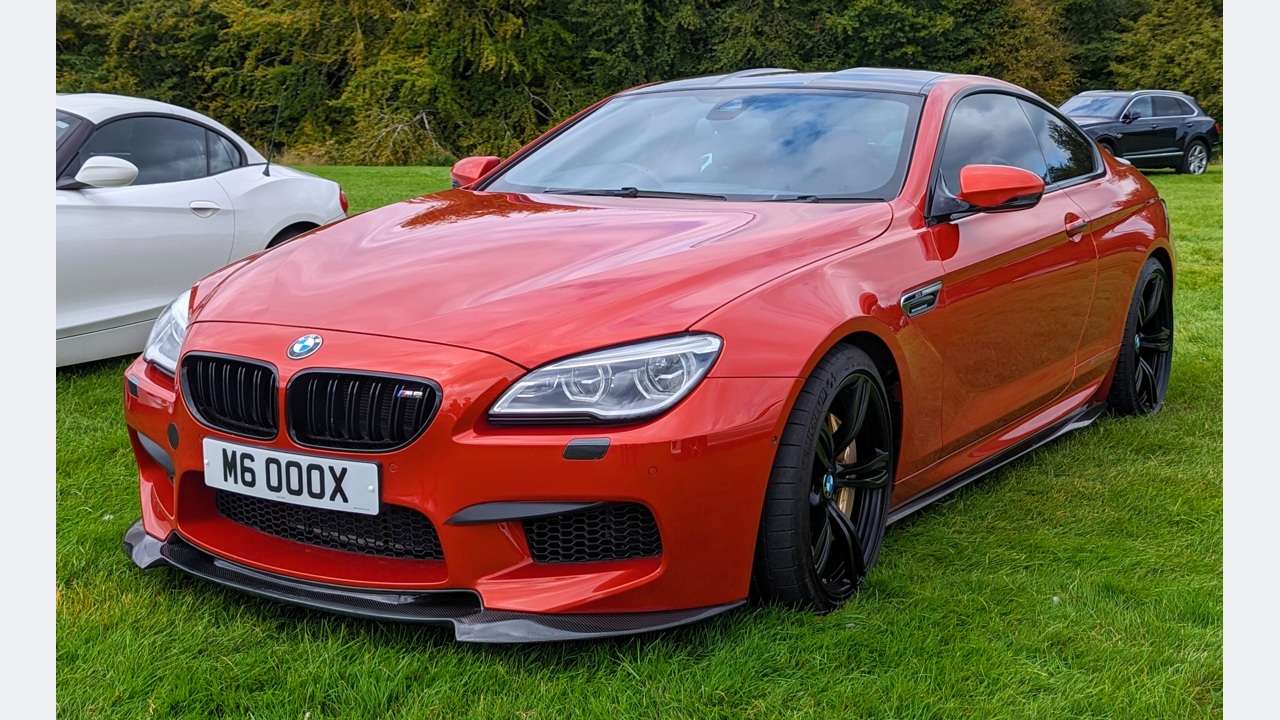
Give the seller the body code as well as “M6”, particularly for a body or assistance concern. Do not use a photograph of the Coupé as proof of Gran Coupé equipment, or assume a pre-update car has the later lights, headunit or software. The proposed featured photograph shows the F13, not both body styles.
BimmerLink: a phone route with exact-car checks
The BimmerLink supported vehicles includes this model family. Compare BimmerLink if you want a phone-based report, but confirm M6 F13/F06 and the actual controllers behind your warning. Family eligibility does not establish every readout or service function.
The UniCarScan UCSI-2100 UK package lists UniCarScan UCSI-2100 Bluetooth LE as a BimmerLink candidate for iOS and Android. The supported adapter and full app entitlement are separate purchases. The UK BimmerLink listing and release history currently requires iOS 15 or later; Android owners should check their current device listing.
Use the Developer adapter selector linked by BimmerLink, which BimmerLink links to, to match the adapter and phone. Confirm a supported F-series adapter for the actual phone/app. Diesel DPF features and S55-only sound tuning are not buying reasons for this petrol V8. BimmerCode is a separate app. Our BimmerLink adapter guide explains the package checks.
A BMW-aware handheld alternative
The iCarsoft BMM V3.0 documentation advertises broad BMW E/F/G coverage and lifetime free software updates. BMM V3.0 is a credible handheld candidate if the seller confirms M6 F13/F06 and the S63-family engine, M DCT and relevant chassis/body reports. A similarly named generic OBD reader is a different purchase.
Confirm the supplied software, accessories and PC/card-reader update process. Neither a BMW logo nor a long service-function menu guarantees the exact reset, active test or coding function on your car. Use our iCarsoft BMM V3.0 guide when comparing packages.
Where OBDeleven fits
The OBDeleven vehicle support includes BMW F-series support, making OBDeleven another candidate after an exact M6 F13/F06 coverage check. OBDeleven Advanced Diagnostics identifies the BMW-capable OBDeleven app and supported NextGen 2 or 3 hardware. First-generation VAG equipment is not this BMW setup.
Eligible diagnostics are available on the FREE plan. OBDeleven licence terms separates optional paid features and Credits; paying does not create unsupported access. Volkswagen Group manual coding and adaptation claims should not be transferred to BMW. Ask which of the S63-family engine, M DCT and relevant chassis/body reports the current configuration actually reads.
A scanner report is a starting point
Save the original report before clearing anything. Keep the controller name, full code and description, present or stored status, and any available mileage, freeze-frame or environmental information. Record what you noticed: a cold start, warm restart, warning light or hesitation. A photograph of the dashboard message is useful alongside the scan.
A report saying a controller did not communicate is different from that controller reporting no faults. Ask whether the tool actually supports it on your build. Fault history, a missing module and a clean engine scan should never be bundled into one reassuring “all clear”.
Do not repeatedly clear warnings to see whether the car appears better. That can remove useful evidence without resolving the underlying issue. Follow the handbook if a warning requires stopping or assistance. Brake, restraint and serious engine warnings need appropriate professional assessment.
Love cool cars? Join Unusual Cars Club FREE!
Get forgotten motoring finds, stories, helpful car content and more.
Free to join. No spam. Unsubscribe whenever you like. See our privacy policy.
When a BMW specialist makes more sense
For a one-off unresolved warning, a specialist report can be better value than buying several incompatible tools. Ask for a vehicle-wide scan with the engine and relevant chassis or body controllers identified, an explanation of current versus historical faults, and the next evidence needed before replacing parts.
The legitimate manufacturer software route is BMW’s BMW AOS, with current account permissions, paid access where required and an appropriate interface. Its BMW AOS technical requirements currently specifies supported Windows 10/11 Pro or Enterprise 64-bit systems and recommends ICOM Next or suitable J2534 hardware; Bluetooth passthrough is excluded. Older-model coverage, application availability and the actual connector arrangement need separate confirmation.
A generic USB cable, a downloaded software bundle or a phone adapter is not proof of complete BMW workshop access. Historical DIS or INPA references help explain old diagnostic reports, but they are not an endorsement of copied software packages. This guide does not provide installation, programming, security-access or calibration instructions.
Before buying: ask these questions
Give the seller the exact model, build date, engine and the warning you want to investigate. Ask which fitted controllers can be read, whether the relevant fault descriptions and supporting values are available, and which adapter, vehicle software selection and update version are needed. Obtain a model-specific answer rather than relying on a large compatibility logo.
Compare the complete package: scanner or adapter, required app purchase, optional connector, update method and any ongoing licence charges. An attractive low price for one component can hide the cost of the rest. Product photographs, similar names and a list of service functions do not establish coverage of your car.
Our Amazon links open focused searches, not a single approved listing or guaranteed compatible bundle. Listings can change and may mix adapters, generic readers and BMW-aware tools. Read the exact description, seller’s coverage information and return terms before ordering. The affiliate tag remains uc-obd-bmw-21.
Common questions
Does this include the M6 Convertible?
No. F12 roof and body-related diagnostics remain a separate scope.
Is this the same as the E63 V10 M6?
No. This is the twin-turbo V8 with M DCT. The E63 has a V10 and SMG III.
Does 120908 prove a turbocharger has failed?
No. The cited early bulletin places it among possible boost-control deactivation faults. Preserve the whole report and investigate the context.
Does Competition Package guarantee more scanner functions?
No. Identify actual equipment and confirm the exact tool. Package names do not establish diagnostic access.
More BMW diagnostic guides
Compare the overall routes in our BMW scanner comparison. For a different vehicle scope, see the M6 E63 Coupé guide. Its vehicle scope remains separate.
Browse the BMW M & M Performance hub, main BMW hub and complete diagnostic-guide directory.
Research reviewed: 14 October 2026. Product coverage, software terms and commercial destinations should be rechecked before publication.
Photo: Calreyn88 / Wikimedia Commons — CC BY 4.0. Resized/framed.