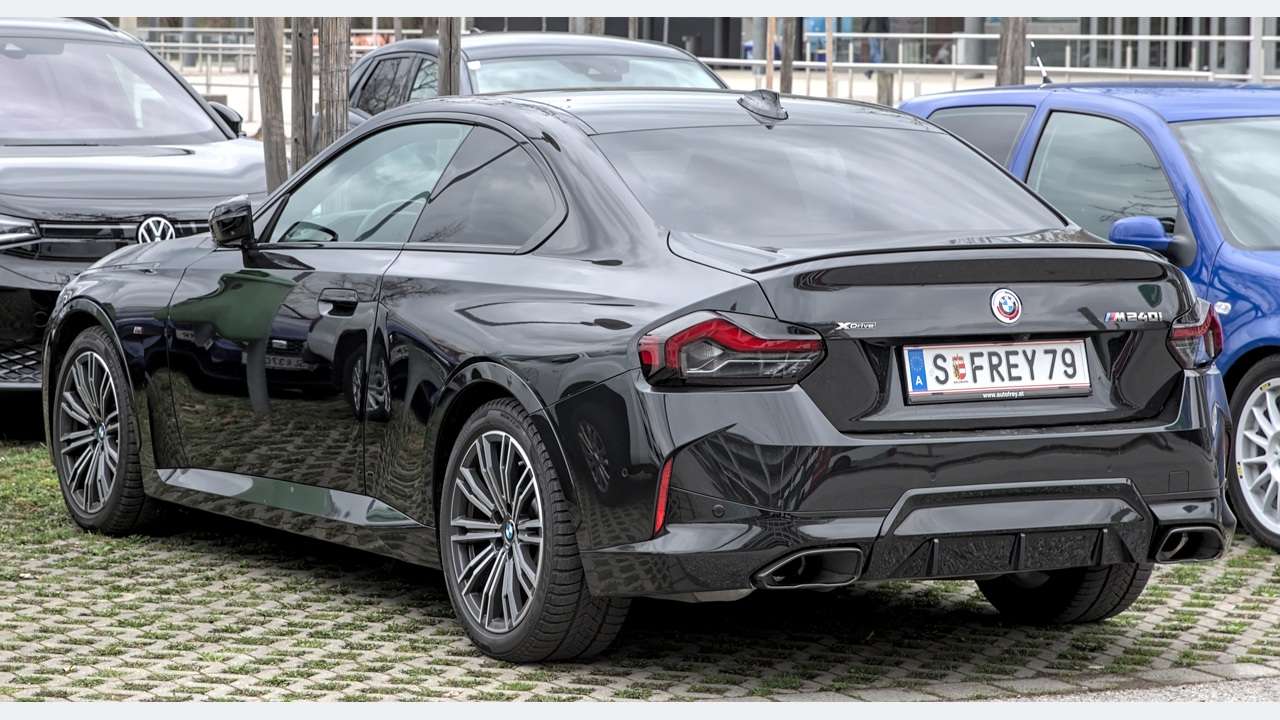
For an original-version UK BMW M240i xDrive G42, buy around BMW-specific reporting rather than an “OBD2 compatible” label. Engine-emissions OBD remains useful, but camera-assistance, xDrive and chassis questions require a different level of access. The older F22 M240i guide is not a compatibility chart for this Coupé: identify the G42 build, software and equipment first.
This is a documentary buying guide. Unusual Cars has not independently tested this vehicle, scanner or function. Exact access varies by build, controller, vehicle software, interface and tool version.
Advertisement: This guide contains Amazon affiliate links. As an Amazon Associate I earn from qualifying purchases.
Which M240i does this guide cover?
This guide covers UK G42 M240i xDrive fixed-roof two-door Coupés from the early-2022 UK launch through the original version before the August 2024 customer update. The core arrangement is a 3.0-litre B58-family turbocharged six-cylinder petrol engine, eight-speed Steptronic Sport automatic and xDrive. The selected scope excludes rear-wheel-drive imports. BMW UKG42launch BimmerWorld engine/chassis model table BMW UK 2024 G42update
It also excludes F22, the F44 Gran Coupé, other G42 engines, G87 M2, updated cars and material modifications. There is a second useful boundary inside the scope: launch cars have the earlier display arrangement; BMW announced Curved Display and Operating System 8 from July 2022. Identify the actual equipment rather than treating every 2022 registration as the same car. The change does not by itself establish scanner compatibility. BMW summer 2022 modelupdates,Englishtext
Quick scanner choice
| Route | Best starting use | What to check |
|---|---|---|
| Generic EOBD reader | Supported engine-emissions codes and selected data | Engine baseline only; not a complete BMW report |
| BimmerLink + supported adapter | Phone-based BMW fault reports and available data | Exact build, phone, adapter and separately paid app |
| BMW-aware handheld, e.g. iCarsoft BMM V3.0 | Dedicated screen and cable without phone use | Named modules and exact software coverage before buying |
| OBDeleven NextGen2/3 + OBDeleven app | BMW-aware scans on supported cars | Correct device/app; diagnostics differ from paid customisations |
Three checks before buying
What generic OBD2 can—and cannot—answer
A compatible basic reader can retrieve supported engine-emissions codes, readiness and selected engine data. That is useful if you want a first look at an engine warning, and it may already reveal relevant evidence. It is not a promise that every manufacturer-specific engine entry or data item will be available. Gendan EOBD engine tools
For a camera warning, xDrive concern or electronic chassis message, ask about that actual system. Do not interpret an engine-only “all clear” as a clean whole-car scan. A dashboard message describes what the driver sees; a BMW-specific controller report can supply the separate detail needed to decide what assessment comes next.
A G42 camera example: 800ABF
BMW SIB 66 08 23 names G42 with listed KAFAS04 assistance options. It describes 800ABF in the context of temporary camera-view restrictions. The important distinction is the camera controller’s report, which an engine-only OBD2 scan does not replace. That entry alone does not justify buying a new camera. BMW SIB66 08 23,20April 2023
If assistance is unavailable, retain the message, the complete report and a note of conditions when it happened. A workshop can consider the actual equipment and warning. Reading the report is not camera calibration, and this guide provides no calibration or safety-system adjustment instructions. Exact KAFAS coverage must be checked before choosing a consumer tool.
xDrive can have a symptom without an engine code
The June 2025 revision of BMW SIB 27 02 20 includes G42 among the ATX13-X applications. Its low-speed shudder description can involve no warning messages, and tyre-fitment or transfer-case-oil possibilities. A clear engine scan therefore cannot dismiss the complaint, and a BMW-aware report is not a mechanical health certificate. BMW SIB27 02 20 revision5,6June 2025
This is a reason to confirm gearbox and transfer-case reporting for your exact M240i, not a reason to buy parts on the strength of a model-wide bulletin. Keep notes of when the symptom appears and whether tyres have recently changed. No instructions to deactivate xDrive, reset adaptations or command the transfer case are included.
The G42 gearbox and equipment are their own scope
This UK scope uses an eight-speed automatic. It does not inherit a manual or M DCT diagnostic route from another performance BMW. A scanner’s eight-speed marketing still needs checking against the actual build, software and data item you want.
Ask separately about DSC, the fitted steering and damping systems, and any differential reporting you need. A factory component’s existence is not proof that a handheld or app exposes its controller. If the complaint involves parking, climate or infotainment, check the fitted system rather than buying a package only for its engine capabilities. The display change within 2022 is especially worth mentioning when describing the car to a supplier.
BimmerLink: buy the adapter and app as a checked pair
BimmerLink lists the relevant vehicle family as supported, but exact functions remain equipment-dependent. It is a phone-based candidate for BMW reporting, not an unconditional promise of every requested readout. BimmerLink supported vehicles
The current iOS listing requires iOS 15 or later and a separate full-version unlock. It advertises viewing ZF 8HP adaptation values; viewing is not resetting. Check availability on your actual gearbox and phone. Android owners should check the current Android listing on their device. UK BimmerLink listing and release history
UniCarScan UCSI-2100 Bluetooth LE is a credible adapter candidate: Gendan lists BimmerLink for iOS and Android, with the app purchased separately. Check the current supported-adapter list. Do not carry an older F-series Veepeak recommendation over to a G-series car merely because both use a 16-pin socket. UniCarScan UCSI-2100 UK package Developer adapter selector linked by BimmerLink
Use our BimmerLink adapter guide to compare the package requirements. An Amazon search for an adapter does not include the app by default and is not a compatibility guarantee.
BMW-aware handhelds: confirm the exact report
iCarsoft BMM V3.0 is a dedicated-screen candidate with broad BMW generation coverage and advertised free lifetime updates. Confirm the exact model, build and named-controller readouts before ordering. PC update requirements are separate from using the handheld at the car. iCarsoft BMM V3.0 documentation
A long list of resets or active tests is not evidence that your particular function is supported. Buy the reading and reporting capability you need first. Our iCarsoft BMW buying guide explains package checks. Search results can mix BMM versions, generic readers, cables and unrelated equipment, so compare the exact product name and contents.
OBDeleven: correct device, app and licence
OBDeleven lists G-series BMWs within its supported families. Its advanced-diagnostics documentation specifies NextGen2 or OBDeleven3 with the OBDeleven app, and includes that diagnostic route in the FREE plan. FirstGen/VAG-app arrangements should not be treated as BMW setups. OBDeleven vehicle support OBDeleven Advanced Diagnostics
BMW One-Click Apps are separate customisations, with availability and Credits or Ultimate terms to check. Do not assume that VAG manual coding or adaptations become BMW functions when you buy PRO. Confirm the specific BMW feature before paying for a plan. OBDeleven BMW features
For this buying guide, the priority is retaining the fault report. A successful scan does not prove a service command, calibration or programming operation is available or appropriate. Optional plan activation and renewal terms should also be checked at purchase. OBDeleven licence terms
When a BMW workshop or legitimate software route is better
A persistent warning, an unexplained symptom after a clear scan, or a need for a manufacturer test plan may justify a BMW specialist. Bring the saved report and symptom notes. A useful consumer reader can help that conversation without replacing the workshop’s assessment.
BMW AOS is the legitimate manufacturer software pathway. Its requirements list Windows 10/11 Professional or Enterprise 64-bit, ICOM Next or a suitable J2534 interface, excluding passthrough Bluetooth. Check current entitlement and requirements; a phone adapter is not an ISTA workstation. BMW AOS technical requirements
Love cool cars? Join Unusual Cars Club FREE!
Get forgotten motoring finds, stories, helpful car content and more.
Free to join. No spam. Unsubscribe whenever you like. See our privacy policy.
Avoid copied ISTA/INPA bundles sold as “dealer software”. This article does not provide programming, security-access or calibration instructions, and does not promise that any consumer product substitutes for every manufacturer workflow.
A useful scan starts with a useful question
Before buying, write down the exact model, production date, engine, gearbox, factory equipment and the message or symptom you want to investigate. Ask the supplier: can this exact configuration read and save the relevant controller report? For live data, name the parameter rather than asking whether “live data” is included.
At the car, use the current tool instructions, save the original fault report and record the symptoms before considering any clearing. A clear operation does not repair a cause and can remove context useful to the next assessment. If the software offers adaptations or active commands, leave them outside this initial read-and-save task.
Do not drive to reproduce a warning for a screenshot or operate a phone while driving. Where the car gives an urgent warning, follow its owner’s manual. This guide helps you select a reporting route; it does not decide that the car is safe to keep driving.
Common questions
Is a cheap reader useless?
No. It can be sufficient for the supported engine-emissions question. The limitation is treating that result as a report on every BMW system.
Does a BMW-specific code identify the failed part?
No. Retain its controller, wording, status and conditions. A code may identify a monitoring problem, signal or consequence rather than the one part to replace.
Can one scanner cover every car in this guide?
That has not been established. Give the supplier your production date and equipment and ask about the exact readouts you need.
Does buying an adapter include BimmerLink?
Not automatically. Confirm the exact hardware and purchase the app entitlement separately where required.
Can a scanner prove the car is healthy before purchase?
No. Reports can add useful evidence, but a clean scan does not rule out every mechanical fault, intermittent problem or previously cleared memory.
More BMW diagnostic guides
Compare the overall routes in our BMW scanner comparison. For a different vehicle scope, see the F22 M235i/M240i guide. Its vehicle scope remains separate.
Browse the BMW M & M Performance hub, main BMW hub and complete diagnostic-guide directory.
Research reviewed: 13 October 2026. Product coverage, software terms and commercial destinations should be rechecked before publication.
Photo: Alexander-93 / Wikimedia Commons — CC BY-SA 4.0. Resized/framed.